Mac OS X Lion Marries Software, 21st Century Computing
Apple’s launch of its Mac OS X Lion is a major departure for several big reasons:
• It’s Apple’s first OS that’s available as a downloadable upgrade from its Mac App Store;
• It’s only $29.99 as an upgrade for those already running Mac OS X Snow Leopard;
• It’s the first new Mac operating system since Apple launched its wildly successful iPad and iPad 2.
The last item is perhaps the most significant, because Apple has taken what have become radically different use patterns for computing and communication -- spurred by iPad and iPhone adoption -- and is now supporting it with its desktop and notebook software platform.
The CRN Test Center downloaded and installed Lion on a MacBook Air running an Intel Core 2 Duo processor with 2 GB of RAM, and found no major problems or issues in the migration. (That’s not counting the expected hiccup of trying to download the software from the Mac App Store the minute the starter’s pistol sounded at the minute of launch, when undoubtedly many others jumped in as well.)
The download on our lab’s connection, which is about 20 Mbps, took about 45 minutes and the installation little more than a half-hour.
Once it finished rebooting, we were treated to a nice little animated illustration showing the new scrolling technique for this new Mac OS. Using multi-touch gestures on the mouse or trackpad, you scroll up to move a page down, and down to move a page up. That mimics the gestures that Apple has built into the iPad. (A simple visit to the preferences page can change it back to classic scrolling.)
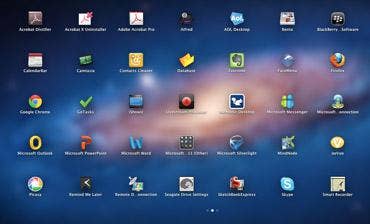
Apart from the new default wallpaper that Lion provided over the old OS, not much appears new -- at first. But a quick glance down to the left corner of the display will show you two, little icons that are poised to make a big difference. The first icon is for the new Launchpad feature -- which when clicked instantly turns the UI into what’s essentially an iPad UI, with icons for each app and application right up on the screen ready to click and launch. Like with the iPad, it allows for scrolling horizontally to different screens to show all the applications that are installed on the system. It marks a nice and welcomed departure from having to drill down into the application folder to find the program you need.
The second little icon is for Mission Control, which gives you an instant view into every application that is currently open in your Mac -- either to navigate between them or shut down applications you’re not using. Mission Control also works nicely in tandem with Apple’s “Workspaces” feature (which provides different desktop work areas).
Apple also takes a leap forward with a major facelift to its Mail, iCal and Address Book features. While not quite ready to be considered an Outlook killer, the trio of applications are light years better than they’ve been. Mail now takes on the same look and feel as it does in Apple’s iPhone and iPad devices; iCal has undergone fairly dramatic cosmetic surgery and now provides color-coded events from different calendar accounts and outstanding Google Calendar synchronization and integration; and the Address Book is built to look like a physical address book, though not as intuitive to navigate as Mail and iCal.
Longtime Apple aficionados may also find it somewhat of a revelation that Mac OS X Lion now allows for “Full Screen Apps” -- in that it allows for an application to be expanded to take over the entire display real estate. Previously, an application would only fill about 85 percent or 90 percent of a display area which isn’t ideal particularly for those with smaller displays. In fact, Microsoft’s Word for Mac provides a nice, straightforward ribbon at the top of the screen when that’s put into Full Screen mode; that’s an indication that developers for the Mac OS X platform will find new ways to extend existing applications to take advantage of the operating system, as well as build new software that does just that. It’s a very nice touch.
For individuals, the Mac OS X Lion update is no more difficult than paying the Mac App Store and following the onscreen instructions. Major applications we looked at, including Office for Mac 2011, and current versions of Adobe Acrobat Pro and Camtasia, are all perfectly compatible from the previous version of the OS to Lion.
There were reports, though, from others on social networking sites of major disappointment because they were attempting to upgrade from earlier versions of the OS than Snow Leopard. Those systems, or any system that’s not running an Intel processor, will not support Mac OS X Lion.
For enterprise deployment as an upgrade: inventory and checklist management will be key, as will application compatibility testing (as it is in every platform upgrade.)
There are many advantages to upgrading to this version, in particular the influence that iOS, iPhone and iPad have had on Apple’s product-development process. The Cupertino, Calif.-based company has done so much with its mobile devices to change use patterns that crafting changes to its flagship platform, Mac OS X, to leverage those new use patterns was very smart. It was also very natural.
While there are some complaints here and there about changes to the scrolling behavior that Apple has included in this version of the OS, the overwhelming majority of changes to Mac OS X here will make navigation between Mac, iPhone and iPad about as seamless as you could get.
For the cost of a $29.99 upgrade, Apple is opening the door a little wider to the next generation of computing and communication. It’s a door into which competitors including Microsoft, Hewlett-Packard and others will undoubtedly be peering as they begin to juggle their desktop and mobile platforms over the course of the coming months and years.
Mac OS X Lion is a winner and, over time, enterprises as well as individuals will be giving it serious consideration. As well they should.