Review: Targus USB 3.0 Dock Supports Apple MacBooks, Windows 7/8 Laptops, Tablets
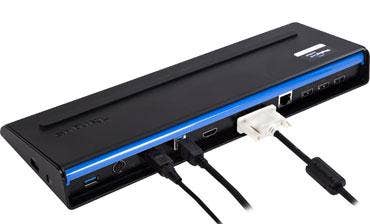
Targus Tuesday made its universal docking station even more universal. The laptop luggage pioneer has unveiled a new version of the Targus USB 3.0 SuperSpeed Dual Video Docking Station, adding support for Apple MacBooks as well as Windows 7 and Windows 8 Pro laptops and tablets, physically connecting any USB 3.0-capable computing device to nearly a dozen I/O ports with a single cable.
In an exclusive opportunity, the CRN Test Center looked at the Targus USB 3.0 SuperSpeed Dual Video Docking Station with Power ahead of its general release. What we found was a solid, sturdy solution that was easy to set up and for the most part worked as advertised. The solution we tested also charges Windows mobile devices and lists for $219.99. Targus also offers a non-charging version for $169.99. Both are covered by a three-year warranty.
Aside from the utility of USB 3.0's blazing speed to move large files around, we've seen few applications of SuperSpeed's near-5 Gbps bandwidth as creative and useful as the Targus docking solution. With help from semiconductor maker DisplayLink, Targus has developed a one-cable, multimonitor answer for today's port-shy ultra-portables and tablets and gives well-connected power users a quick and easy way to hit the road and return to productivity once they return.
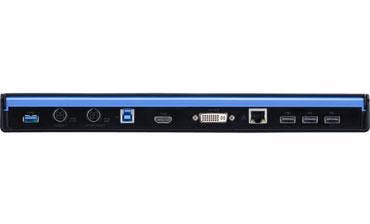
The Targus Docking Station provides DVI and HDMI video output ports, and both can be used simultaneously at resolutions up to 2,048 x 1,152. Also included are DVI-to-VGA and HDMI-to-DVI cable adapters, which cover most situations. There's a USB 3.0 host port and cable for connecting the laptop to the dock, plus two USB 3.0 ports for high-speed peripherals. The dock also delivers four USB 2.0 ports. Why all those legacy USB ports? Well, two can be for mouse and keyboard, and the remaining two -- which comply with the USB battery charging 1.1 spec -- are good for charging battery-operated devices such as tablets and cellphones. The dock also provides mic and headphone ports plus a Kensington lock slot. It's all powered by a 6-amp AC power adapter.
NEXT: Installation And Ease-Of-Use
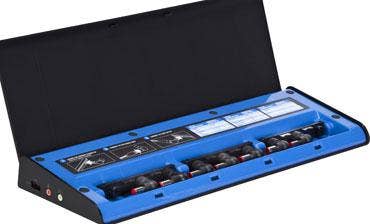
But all that connectivity isn't even its most clever part of the Targus USB 3.0 SuperSpeed Dual Video Docking Station with Power. For charging devices that draw up to 90 watts, the solution includes a power output port and short cable with plug adapters under a flip-up cover to fit most popular laptops and some tablets, permitting road warriors to leave their power bricks in the bag. Unfortunately there's no MagSafe adapter, so MacBooks will have to use their own charger.
The disc included with the test unit contained only Windows drivers. So to connect our test MacBook, we visited the Targus driver page, where we found software for Intel-based Macs running OS X 10.6.8, 10.7.5, 10.8.3 (the latter was running on the test MacBook). The same Targus driver page contains links to video and Ethernet drivers for Windows 7 and Windows 8 as well. The DisplayLink DMG downloaded in less than a minute over Wi-FI and ran as a standard installer package. There's also an uninstaller package included. During tests, the driver installed in a minute or two.
While the MacBook was restarting, we ran an HDMI cable from an external monitor to the docking station's HDMI port. We connect often to this monitor from the MacBook, so we're familiar with its operation and it's familiar to the Mac. We also plugged in a USB mouse and keyboard and connected the dock's Gigabit Ethernet port to our network. Next we ran the included USB 3.0 cable from the dock's host port to the Mac. After a few seconds, the monitor blinked to life and set itself up as the primary display, just as is the preference when plugged directly to the MacBook.
NEXT: MacBook Known Issues
Things looked fine at first, but we soon noticed that there was a problem. Normally the preferred resolution when connecting the MacBook to the test monitor is 1,920 x 1,080, but that setting with the Targus dock caused the desktop's outer perimeter -- including the menu bar and much of OS X's Application Dock -- to be cut off. The problem was solved by reducing the display resolution. We found the highest resolution that also kept everything visible was 1,680 x 1,050.
As one might expect, the monitor exhibits a slight performance lag, particularly when invoking the OS X Dashboard, Command Center and other apps that refresh the entire screen. This lag didn't interfere with productivity or work flow. There's also a slight choppiness in the video portion when playing high-res content in full-screen mode, but again most people probably wouldn't notice this. However, our test system exhibited a lag of close to four minutes when opening the Display Preferences panel, giving us cause for concern. There are other known issues with Mountain Lion, including an inoperable audio output jack and intermittent blank screen when returning from sleep. Of these, only the audio issue presented during our tests; return from sleep worked fine when it was tried.
On the whole, the Targus USB 3.0 SuperSpeed Dual Video Docking Station with Power is a stable, economical solution that's easy to install and provides a hedge against the obsolescence of proprietary docking products; drivers are backward compatible with Targus' original USB 3.0 docking stations introduced last year. This is a recommended product by the CRN Test Center.
PUBLISHED MAY 7, 2013
This story was updated on May 7, 2013, at 10:14 a.m. PST, to correctly reflect the pricing and warranty of the Targus solutions.