First Look: Chromebook's Role In The Enterprise Questionable
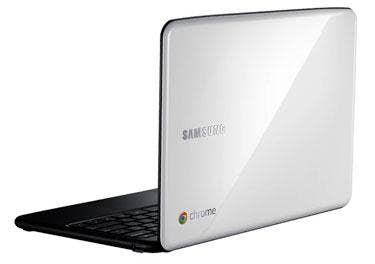
How much time do workers spend using a Web browser? With the all-browser-all-the-time Chromebook, which begins shipping Wednesday, Google is betting big that its ChromeOS-based notebooks from Samsung and Acer will find a home in the enterprise.
We looked at Samsung's Chromebook Series 5, a sleek, light and comfortable 12.1-inch notebook with enough speed and power to satisfy most Web warriors. Its top row of keys dedicated to Web functions prove its pedigree, and its smooth lines and curved corners will appeal to the aesthetics of many people.
But a machine that offers so little control over its file system, virus protection and hardware settings and that depends so much on a network connection places serious limitations on its usefulness in the enterprise.
The first issue will be Chromebook's reliance on the cloud for virtually all of its productivity applications. Some companies will object outright on security grounds to storing all of its intellectual property so amorphously. Others will think it's just fine. For them, Chrome OS syncs perfectly with Gmail and Google Apps, and even prompts for the user's Google ID when first launched. Of course, there's also the Zoho suite of mature online apps as well as Microsoft's rapidly maturing Office 365. In our tests with Outlook Web Access, the Chromebook worked perfectly without plug-ins and performance was quite snappy.
Printing from Chrome OS also will be a major concern for the enterprise. Always forward-thinking, Google handles printing with Google Cloud Print, a cloud-based service that allows compatible printers (ones that can connect directly to the internet and are running the appropriate service) to register themselves there and be available for outputting hard copies. Today, the only such printers are the ePrint line from Hewlett Packard.
Classic printers also can be made available to Chromebooks, but must first be connected to and shared by either a Windows or Apple computer (with Mac OS X 5 or later). Most offices will be able to accommodate this, but it's yet another maintenance burden for an already stretched IT. And descrepancies exist about which versions of Windows are supported; Google says XP only, but Samsung's online user manual claims support for Windows XP, Vista and 7. Linux support is "coming soon," says Google.
Next: Some Drawbacks
IT departments will bristle at the Chromebook's lack of user control over hardware settings. Chrome OS offers virtually none except touchpad sensitivity and tap-to-click, and a WiFi radio toggle. File system access consists of raw listings of internal (SSD) and external (USB 2.0) devices that appear in a browser window, as does everything else in Chrome OS. The absence of a "Finder" or Windows desktop will take some getting used to, particularly by old-timers like us.
We like the way the the cursor is controlled by the Chromebook's large touchpad, which works in a way more similar to that of Mac OS X than Windows. A quick touchpad tutorial appears when first starting the machine to demonstrate how to right-click, two-finger scroll and drag and drop. Once you're accustomed to this style, it's hard to go back to the norm for Windows.
Disabling the system's power-saving features, normally a part of our battery test methodology, was not an option. And Chrome OS also is unable to play AVI files out of the box, so we streamed a movie from Hulu.com and cranked up the screen brightness to its maximum of 300 NITs. As we wrote this, the machine had been playing "Clerks" continuously for four hours and forty minutes, and its dual-display batery status icon still showed 23 percent battery life or about 1:30 remaining.
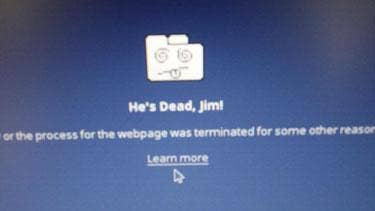
During part of this lenghy video playback, we tested and explored other Chromebook features, and as such had as many as 15 tabs open at a time. What we discovered was that when returning to a tab that was inactive for a long period of time, an error was displayed showing the same humorous folder-face image and non-specific message. This happened at least 10 times during our tests, and should send up some red flags. There appeared to be no feedback system to report such errors to Chrome OS developers.
There's no question that the $500 device will be popular among today's social youth, who spend enormous blocks of time tweeting, Facebook chatting and video calling. All of these services come quite naturally to Chrome OS, and there's already a shriving community of users, developers and evangelists. The real issue is whether Chromebook will be versatile and secure enough for the enterprise. That remains to be seen.