Bake-Off: 4 Linux Desktops Tackle The Enterprise
But despite the huge progress the Linux community is making every day, some of the old challenges are still limiting the operating system from posing a threat to Microsoft on the desktop. Companies looking for a complete IT infrastructure alternative to Windows face some intricate challenges.
SLIDE SHOW: 4 LINUX DESKTOPS TACKLE THE ENTERPRISE
\
The
CRN
Test Center examines the four leading Linux desktop products for the enterprise.
Even though the driver ecosystem continues to gain momentum, one of the biggest challenges for Linux desktops is driver compatibility with small hardware vendors. Most manufacturers do not yet view Linux as an equal to Windows on the desktop, so Linux drivers are not prioritized or even developed. The open-source community is still one step behind many hardware innovations.
Windows is a platform that offers many configurations for workgroup setups and data centers and can run many specialized application servers. What's more, thousands of corporate applications are still written and supported by software vendors and developers that only work with Windows.
While Linux is chipping away at some of Microsoft's server market strongholds, the Linux desktops are still lacking many business productivity applications. Software vendors have to see that the opportunity for additional revenue streams through the desktop Linux market before producing Linux product lines—and this is happening at a slow pace.
Methodology
For this review, the CRN Test Center evaluated offerings from the four leading Linux enterprise desktop alternatives: Linspire Five-O, Novell SUSE Linux Enterprise Desktop 10, the newly released Red Hat Enterprise Linux Desktop 5.0 and Xandros 4 Professional.
A word of caution: The Test Center initially tried to install the distributions using the dual-boot option on a new Vista-based PC with an Athlon 64X2 dual-core processor and Asus M2NBP-VM CSM Micro ATX motherboard. But three of the four distributions failed to load properly even without using dual-boot. Only Xandros booted up, but it did not include a driver for the motherboard's Nvidia MCP51 Ethernet controller. And when booting into Vista after Xandros installed, Vista failed to load. During a detailed boot of Vista, engineers noticed that it could not load the crcdisk.sys driver. Vista was paralyzed. We suspect the problem was the lack of drivers.
After various attempts, engineers used an older AMD ATX motherboard running Windows XP, and all the Linux desktops worked correctly. Engineers also tested the OSes on a newer Intel HP xw4400 workstation and the desktops installed.
Our advice—run a complete backup before installing Linux with dual booting on a PC system running Vista. Before committing to Linux OS installation jobs, solution providers also should develop hardware surveys or purchase hardware capture utilities that can help them build hardware asset lists.
In addition to running the OSes, engineers looked at the various applications and partner programs available to VARs. Here's what we found:
Next: Linspire Five-0 Linspire Five-O
Linspire recently said it will be using the Ubuntu Linux platform as a new base for all future versions of Linspire and its free version, Freespire Linux OS. But it intends to bundle the same proprietary software with Ubuntu as it does with its current version.
The company will also maintain the same Windows-like user experience by tweaking the desktop's look and feel.
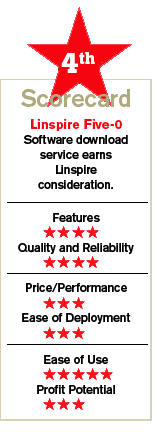
Linspire's OpenOffice suite comes bundled with proprietary applications such as Windows Media and some hardware drivers. Like the Microsoft update site, Linspire also can push drivers down to desktops through OS updates. However, most new drivers come bundled on major releases. Right now, customers that purchase Linspire's digital desktop version will receive StarOffice 8 for free.
Linspire Five-O bundles a communication suite that comes standard with both desktop OSes. In addition to the standard software stack, Linspire arrives with media suites for photo editing, DVD/CD burning and playing. Linspire also comes with security tools such as VirusSafe and SurfSafe.
Setting up a printer with Linspire is simple. Linspire arrives with an intuitive wizard-driven menu for adding and configuring printers. Windows users will find the process easy.
Out of the box, Linspire can only open some Microsoft Windows and Office file types such as doc, ppt, xls and wmv. Unfortunately, Linspire provides a limited migration path from Windows to Linux. Aside from doing some file conversions, there is not much more VARs can do to migrate all Office files and macro objects into Linspire's OpenOffice. With the exception of SUSE, the other OSes in the review are in the same boat. However, Xandros takes a direct approach to running some Windows applications.
Savvy VARs can offer the StarOffice Enterprise product to expand the migration services of some Office applications. However, it is a lot easier for VARs to sell the Linspire desktop OS to customers that are using the basic features of Office and are not using third-party Windows applications that are critical to their businesses.
Linspire's Click 'N Run (CNR) automated software installation service, which now offers about 20,000 Linux applications, allows users to download and purchase applications remotely. The company says all the applications are tested on Linspire and Freespire and are designed to work right from the same site, without having to link to third-party sites to download dependencies.
The company made the CNR tool simple and powerful for Linspire desktop users. Each application has a description label and it is categorized for easy searching. By simply clicking on the green CNR button after selecting an application, the Linspire desktop will download and install it and place the application's icon on the desktop and in the menus. The company promises that the Ubuntu-based release will also be able to use CNR, which is one of Linspire's advantages in the market.
Linspire's partner program is free. The partner portal provides access to the software for evaluation, tools for testing Linux applications, hardware certification tools to certify motherboards and other components, marketing resources and training material, including product documentation.
Next: Novell SUSE Linux Enterprise Desktop 10 Novell SUSE Linux Enterprise Desktop 10
Of the four enterprise desktops, Novell appears to be the most serious alternative to Microsoft Windows. For almost a year now, Novell has been offering an enterprise-class Linux desktop that competes with Windows on many levels. However, as with other Linux desktops, SUSE suffers from a lack of drivers.
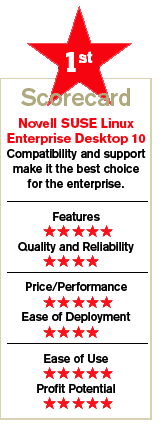
SUSE Enterprise Linux Desktop 10 ships with the Novell edition of OpenOffice. Novell's OpenOffice code abides with the open-source license and is certified to work with SUSE. As with StarOffice's Enterprise suite, Novell's OpenOffice can run Visual Basic macros. Although Novell's macro library does not cover all the VBA macros, many commonly used macros written for Excel and Word will run on SUSE.
In addition to macros, enterprise customers also face some file interoperability problems between Microsoft Office and OpenOffice. For instance, OpenOffice cannot read Microsoft Office 2007's new DOCX file format. Novell built translators in its OpenOffice edition so that it works with DOCX files. Like every open-source innovation, the translators are freely available, but the OpenOffice community has yet to adopt them.
SUSE Enterprise ships with Novell's Evolution e-mail client and an Exchange connector. When migrating from Outlook to Evolution, solution providers might encounter some problems transferring calendar and address book data over to Evolution. Integrating with old versions of Outlook has always been difficult because Microsoft has never simplified it.
SUSE Enterprise arrives with Mono, which is the open-source version of Microsoft's .Net framework and runtime. With Mono, .Net applications can run on SUSE. The Mono project recently unveiled a new .Net Visual Basic compiler, which allows developers to port over many Visual Basic applications to Linux. Because of the Mono integration, SUSE ships with iFolder, the Tomboy note-taking application and the F-Spot photo management application. IFolder allows users to share files on a peer-to-peer network. The iFolder server, which is free, automatically replicates documents on all desktops that are running the iFolder client. In addition, SUSE includes the Beagle search engine, which runs on Mono. The Beagle engine is a great tool for searching an entire desktop, including e-mail, instant messaging, music files and PDFs.
Novell made navigating through SUSE's Gnome desktops extremely cool. Users can rotate desktops on a 3-D cube. SUSE includes Samba, which allows users to authenticate to Active Directory. For extra security, SUSE arrives with Novell's security framework, which establishes normal behavior profiles for every desktop. Applications are quarantined whenever users try to do things outside a profile.
Novell is assisting partners with desktop installations and file migration services, including providing Level 1 through Level 3 support. Novell leaves it up to partners to select which level of support they want to provide, while it picks up other levels. For instance, Novell will do Level 2 and Level 3 support for partners that are only providing Level 1 support. With this multilevel flexibility, Novell is attracting large partners as well as small consultancies.
Like Linspire, SUSE has made software purchasing extremely easy. Right from the desktop, users can click on Novell's Customer Center link and select software they want to purchase. Since software installations are usually managed by administrators, solution providers can configure SUSE desktops so that software is dispatched through a central location.
Novell charges about $50 per seat per year for OS and software updates. Novell is also teaching partners to take advantage of some of the customization and configuration features in SUSE. Since customers spend about 90 percent less on Linux licenses than Windows licenses, partners are encouraged to sell deployment services using SUSE's various deployment options and features.
Next: Red Hat Enterprise Linux Desktop 5.0 Red Hat Enterprise Linux Desktop 5.0
This month, Red Hat entered the enterprise desktop market with the release of version 5.0. In addition, Red Hat unveiled a new Red Hat Exchange partner program that aims to provide enterprise-level support to its customers. Exchange will help ISVs sell middleware.
As part of Exchange, a hosted Command Center will allow solution providers to monitor desktops remotely. Pricing has not been disclosed. With the acquisition of JBoss, Red Hat is also aggressively expanding its enterprise application stack. Red Hat now offers an enterprise Global File System to cluster servers and embeds virtualization technology into its Enterprise Linux product line.
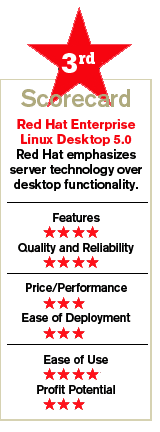
However, while some of the server technology has trickled down into Red Hat's Enterprise Linux Desktop, average corporate users have little to gain from these features.
Overall, the company is still emphasizing server-level products over desktop software and functionality, and Red Hat's Enterprise Linux Desktop 5.0 seems to fall short of an enterprise-class desktop. In fact, it can be thought of as a network edge server for the desktop. For instance, Enterprise Desktop includes a Java Virtual Machine, but does not include the open-source .Net environment. According to Red Hat, it has no plans to include open-source .Net products.
Red Hat's Enterprise Desktop productivity tool suite is the same toolset used on its standard desktop and comparable to the ones offered by Linspire's and Xandros' corporate Linux desktops in this review. Red Hat includes OpenOffice, Samba for printing to Microsoft printers, MySQL database and other productivity products.
To use the desktop for software development, corporate developers can upgrade their desktops to Red Hat's workstation option. System administrators can also use the workstation option to monitor system resources, security and applications.
Now with version 5.0, the Red Hat desktop arrives with a new provisioning module that allows administrators to create different desktop configurations based on any group of users. Administrators can use the provisioning module to control new software and upgrades that are pushed to desktops. Once a group has been created, by simply selecting a software and user group the provisioning process takes over and manages all the installations.
Red Hat offers a remote and a local provisioning configuration for desktops. The company recommends using a Satellite provisioning server for VARs that are monitoring desktop systems and running patch updates. With the Satellite server, VARs can manage multiple customers from a single location. Another option is to use a proxy server, which allows VARs to manage desktop applications while the network entitlements remain controlled by Red Hat's remote management service. Auto updates also are managed this way.
Red Hat's desktop integrates with authentication and identity modules. With Active Directory, for instance, the same Kerberos credentials used by Windows users can be transferred to Red Hat users. For the past few months, Red Hat has upgraded its certified engineering classes to teach solution providers how to connect Active Directory with Red Hat Linux desktops. Red Hat recommends partners have at least one or two certified engineers on staff.
In addition, Red Hat offers a virtualization option with the workstation, which allows up to four guest operating systems. Red Hat's virtualization OS layer is based on Xen's Hypervisor technology. By combining the workstation with virtualization, corporate developers can use the desktop as a development and test environment. Client/server software can be tested right on desktops.
Customers looking for new software products have to go third-party sites to buy them. Red Hat encourages VARs to make separate deals with commercial Linux software vendors instead of using the Red Hat catalog.
Red Hat also made an announcement about a new MDF program for partners but has not provided all the details yet.
Next: Xandros 4 Professional Xandros 4 Professional
The Xandros 4 Professional Desktop might be the best choice for small companies. Xandros has gone to great lengths to make its Desktop product easy to use and feel like you're working on Windows XP. Solution providers should seriously look at the Xandros Desktop.
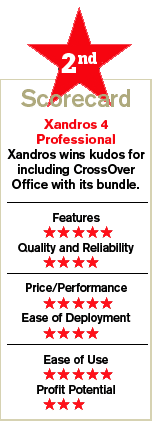
In addition to OpenOffice, Xandros Desktop arrives with CodeWeavers' CrossOver Office suite, which runs Microsoft Access and Excel on Xandros' Desktop. CodeWeavers' CrossOver Linux tool, which is based on the open-source Wine technology, now runs hundreds of Windows-based applications natively. From WinZip to Adobe's Photoshop, the CrossOver technology can help solution providers migrate many desktop applications.
The Xandros Desktop follows many of the same procedures used by Windows users to connect to networks and share files. For instance, Xandros can authenticate directly to Active Directory or a Windows PDC. What's more, Xandros includes an option to share Windows files. The options for sharing are similar to Windows XP.
Xandros Desktop arrives with a full security suite that integrates antivirus, firewall and a system file protector to detect spyware. In addition, Xandros includes an automated security patching tool that connects to Xandros Networks and works like the Windows XP auto update feature.
Xandros Professional includes a Desktop Management Server application to help manage user accounts, servers and computers. In addition, the management server helps solution providers manage software installation from a central repository server.
Xandros Professional arrives with an Evolution e-mail client and Scalix connector, which allow users to receive e-mails at any time, even during peak hours. The Scalix collaboration platform provides a migration path for Exchange.
Xandros has taken direct steps to work with partners so that they can sell its OS and also profit from services such as remote administration, storage and backup and application installations. According to Xandros, margins based on the sale of the OS and its automated services are enough by themselves to support small solution providers.
Xandros now has a dedicated channel support team to help partners with lead generation, outbound calling and marketing material support. This year Xandros is helping partners sell the OS to financial services companies, schools and government municipalities.
Next: The Bottom Line The Bottom Line
Surface-deep features are not enough anymore, as more companies than ever before are seriously considering migrating to Linux. However, the UI and navigational changes that Linux vendors are making in Linux desktops to improve the user experience are still far behind Windows. Simple routines such as adding a Flash player or Java plug-in on Firefox can be a tedious experience. The Linux File Manager is not as intuitive as Windows Explorer.
While all four Linux vendors offer attractive suites, Novell leads the pack by paying close attention to enterprise features that allow users to work with .Net and Visual Basic macros. Novell also has the manpower to assist solution providers on large-scale deployments.
For the enterprise, Red Hat Enterprise Linux Desktop 5.0 is the competition, but its software bundle did not impress Test Center engineers. Linux vendors need to offer the best productivity tools they can bundle to remain competitive with Windows. Red Hat offers a highly competent desktop product but its default productivity products are too simple.
Red Hat also fails to provide some open- source Microsoft technologies out of the box, including key features in OpenOffice that allow users to import various Microsoft Office objects and files. Enterprise customers will be looking for interoperability and compatibility with Microsoft.
What's more, with the exception of a remote monitoring service, which is useful for managing desktops, the Red Hat Exchange partner program aims to help primarily ISV partners sell enterprise middleware and provide support.
Linspire and Xandros are forging ahead with many new, innovative features that simplify usability. Both products are geared toward SMB and departmental-level deployments, rather than large-scale enterprise rollouts, and are worth considering for such applications.
Linspire's CNR service is a plus. However, Linspire isolates users from Windows applications and files more so than Xandros. Xandros is more expensive than Linspire because the company has taken the bold move of offering the CrossOver Office suite for environments where it's necessary to run Windows applications. We think it's the right approach and worth the extra expense for most customers.
COMPANY:
Linspire
San Diego, Calif.
\
(858) 587-6700
\
\
\
•
PRODUCT:
Linspire Five-0
\
•
PRICE/SUPPORT:
$60 with installation support
\
•
PARTNER INCENTIVES:
Participate in revenue sharing from software downloads up to 15%.
\
•
PROGRAM PARTNERS:
4,500 resellers.
\
•
PROGRAM COSTS:
No program fees.
\
•
DISTRIBUTORS:
Ingram Micro
COMPANY:
Novell
Waltham, Mass.
\
(781) 464-8000
\
\
\
•
PRODUCT:
SUSE Linux Enterprise Desktop 10
\
•
PRICE/SUPPORT:
$50 per year, per seat with technical support, updates.
\
•
PARTNER INCENTIVES:
MDF available based on partner level
\
•
PROGRAM PARTNERS:
5,400 resellers
\
•
PROGRAM COSTS:
Varies depending on program level, type and training.
\
•
DISTRIBUTORS:
Alternative Technologies, Ingram Micro, Synnex, Tech Data.
COMPANY:
Red Hat
Raleigh, N.C.
\
(919) 754-3700
\
\
\
•
PRODUCT:
Red Hat Enterprise Linux Desktop 5.0
\
•
PRICE/SUPPORT:
Starting at $60 per year for 1-socket desktop with basic support.
\
•
PARTNER INCENTIVES:
Two-level partner program offers MDF, free training.
\
•
PROGRAM PARTNERS:
NA
\
•
PROGRAMS COSTS:
NA
\
•
DISTRIBUTORS:
Ingram Micro, Navarre.
COMPANY:
Xandros
New York
\
(212) 213-8083
\
\
\
•
PRODUCT:
Xandros 4 Professional
\
•
PRICE/SUPPORT:
$100 with installation support for 90 days.
\
•
PARTNER INCENTIVES:
All leads are passed to partners; 2% MDF for Gold partners
\
•
PROGRAM PARTNERS:
150 resellers
\
•
PROGRAM COSTS:
$299 for middle-level Gold partners.
\
•
DISTRIBUTORS:
Ingram Micro, Navarre.