Review: SmartDraw VP Best In Breed
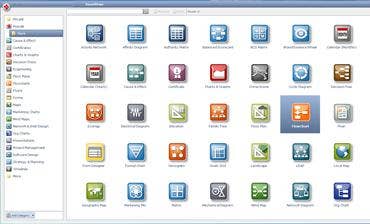
The first hint you may get when you install SmartDraw VP -- the visual aid, graphic and chart-creation software -- is that it is not your typical office application. Not unless your office includes crime scenes and military battlefields.
SmartDraw VP, which is created by the San Diego, Calif.-based company SmartDraw, is billed as a "visual processor" and that may be actually selling it short. Not only does this application surpass Microsoft's Visio in ease of use and functionality, it could also be billed as a "decision processor" or a “get organized!” processor because of the granular level of detail -- in graphic form -- it supports.
A reason for using diagramming or graphic software like this is to present as much information as possible, in an easy, intuitive presentation. It lets someone view and process an entire field of information at once. Whether an organizational chart, a geographic map, a mind map, a calendar or even a crime-scene rendering, diagrams and charts can make it a lot more efficient to digest a lot of information at once.
SmartDraw VP provides literally scores of different templates to provide a nice head start in developing diagrams, graphics and charts. Its reach extends from flow charts and organizational charts to auto accident recreations and military battlefield operations. It provides a diagram template for retail stores to allow for charting out which products fit in which selves, and in which order. And, in the crime scene template noted earlier, it allows for positioning of chalk outlines of bodies, weapons, bullet casings and even cigarette butts in a fixed area.
The application saves files natively in its SDR format, but will also export files as JPG, GIF, PNG, HTML, DOC, PCX, TIFF, DXF, SDT, EMF, WMF, BMP, PPT, XLS and PDF formats. Using SmartDraw VP, it’s possible to import data from an Excel spreadsheet for conversion into pie charts, bar charts and more. This was particularly easy.
For navigation, clicking the Smart Button at the top left of the application will open a drop-down menu. And the application provides breathtaking integration with Microsoft Office by placing one-click “hot buttons” above the Smart Button that export SmartDraw diagrams to PowerPoint, Excel or Word or PDF. It’s outstanding.
With list prices of $297 for a single license, $1,485 for five licenses and $1,695 for 10 licenses, SmartDraw sells this software directly and through VARs.
The software runs on Windows 7, Windows Vista, Windows XP or even Windows 2000, but does not support Mac OS X. (SmartDraw support says there are no current plans to offer a Mac version.) SmartDraw VP requires a half-GB of RAM and 3 GB of free hard disk space. It can be installed over a network or on individual PCs.
In the CRN Test Center lab, we installed it quickly on a PC running Windows 7 Ultimate with an Intel Core 2 Quad processor and 4 GB of RAM. With this PC, SmartDraw VP was quick and snappy.
Including free, Web-based offerings, productivity software applications can literally be a dime a dozen. But once someone starts using SmartDraw VP to bolster documents, communications and data organization, it’s hard to stop. This is productivity software that clearly will boost productivity. It’s hard to think of any enterprise that couldn’t benefit from deploying it.