Review: iWork On iCloud, iOS 5 And Mac OS X
There are, in fact, seams. And Apple should have done better. Having stated that, the package of products and services from Apple that turn standalone applications into mobile, collaborative apps is important and will, hopefully, get better over time.
Pages, Keynote and Numbers are very nice stand-alone apps in and of themselves and Apple has done a great job of providing a common interface for productivity between its Mac OS X computers, its iPhones and iPads. But since Apple has taken the steps of pitching these as part of a broader solution for being productive on the go, let's look at the solution.
iWork
As noted, this is the suite of applications that include Pages for word processing, Keynote for creating and editing presentations, and Numbers, Apple’s spreadsheet application. They are all adequate productivity applications -- even for those who have been organized around the Microsoft Office suite for any length of time.
On the Mac, Pages provides a much different ribbon layout that Microsoft Word. Essentially, you’re given a choice of actions including outlining, dividing a document in to sections, adding boxes for text, shapes and photos, tables, charts and comments for those who are collaborating. You can also navigate to the ribbon for choices in fonts, text and background colors and embedded multimedia.
Some will view this as simply a clean, straightforward word processing application. It is.
The same minimal-but-functional approach has also been taken with Keynote and Numbers. For the Mac, each of these applications by themselves is $19.99 as a download, or $79 as an iWork bundle from the Apple Mac Store. On the iPhone or iPad, they are $9.99 from the Apple iTunes App Store. But that’s the key. Unlike Microsoft’s Office, these applications are available on Apple’s mobile iOS platform with a very similar interface.
Next: Trying To Get The Pieces To Work In Harmony iWork.com (beta)
If you’re used to certain levels of functionality with, for example, Google Docs, you’ll be disappointed with iWork.com. This is not a web-based version of the iWork productivity applications, but rather a dashboard that lets you keep track, share and download iWork documents on the Mac. In fact, some aspects of iWork.com are just downright lame. For example, iWork.com provides a link to “News,” (we’re left to presume it’s news about iWork.com.)
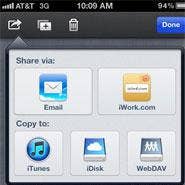
But all that link does is deliver you to Apple’s iWork.com blog, where the most recent item as of this writing was 10 months old. Separate from the browser interface, though, Apple has built an iWork “share” button onto its iWork applications; clicking that button brings up a nice, easy-to-navigate menu for sharing a document with others, publishing a document to the Web, or making a document available to yourself for future download.
On the iPad and iPhone, iWork.com beta is, essentially, an integrated “sharing” option. It’s not intuitive. Once you create a document - in either Pages, Keynote or Numbers - you can’t share through iWork.com beta directly from the document. That’s needlessly confusing. To share, you need to go to your entire menu of iWork documents on an iPad or iPhone, click the Edit button, and only then will the standard “share” icon reveal itself. Eventually, through trial and error, we figured out how to find that share icon, highlight the proper document, and then share it via iWork.com beta. Even then, sharing through iWork is little more than emailing a link to an online document.
iWork.com beta may just be the kludgiest piece of technology that Apple now has on the market. It does work, though, for sharing and saving.
iCloud for iWork
If iWork.com beta is the web service that permits for sharing and synchronization of iWork documents across platforms, iCloud is the hosting infrastructure for iWork.com.
Importantly, iCloud so far has shown itself to be reliable from an uptime perspective. But Apple has much more work to do to make iCloud, iWork.com beta and iWork to reach its full potential as a productivity and collaboration platform. Here are a few examples of what needs to be addressed:
* iWork apps, iCloud and iWorkbeta.com don’t follow standard use patterns for sharing documents from mobile devices. Apple needs to include a “share” and “save” icon in each document, rather than making you leave the document, go to a dashboard, and fumble around until you figure out how to do it from outside the document.
* There are too many steps to get these applications to work over iCloud across devices. You need to enable an iCloud account, and, in many cases, sign up for additional storage beyond the free 5 GB Apple gives you. Then you need to enable iCloud on each, individual device. And then you need to enable iCloud for each, individual iWork app across devices. In all, it could take you ten steps to share one document between an iPhone and an iPad. That sort of defeats the purpose of a “productivity app,” doesn’t it?
* iWork.com beta sharing is really little more than sending a link to a web document via email. While the strength of this solution is that, once shared, collaborators can easily work on a document, write up comments or make suggestions in the document, it’s a lot of hype and effort but, at its essence, just a step above Sneaker Net on the sophistication scale.
The apps themselves are very nice, very price-competitive and are just stellar for creating and editing documents on iPhone or iPad devices. They support industry standard file formats. And they work. But Apple has its work cut out for it to make these applications synch and work well across devices - if for nothing else but to get them to live up to Apple’s own marketing.