Review: Meet 'Lisa,' Linux Mint 12
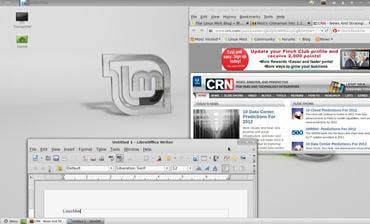
For someone who has never before tried out a Linux desktop, consider telling them to make Linux Mint 12 their initial exploration.
This version of the Linux distro, which launched late last year, is code-named “Lisa” and runs the relatively new Gnome 3 desktop graphical user interface. It is based on Ubuntu 11.10.
This version has become known throughout Linux circles for a couple of big reasons. First, for new Linux adoptees, Linux Mint 12 comes across as just an outstanding, easy-to-deploy, easy-to-manage PC operating system. Linux Mint 12 is the kind of OS that, were it around in this iteration at the same time as Microsoft Launched Windows Vista, it might have rendered Microsoft into little more than the Xbox company.
Linux Mint 12, in deploying with Gnome 3, means essentially this: Instead of being able to customize features like themes, it trades in those capabilities for the ability to create multiple “workspaces.” And that has led to the second better-known result of Linux Mint 12: an effort by developers to keep as much of the Gnome 3 functionality while combining it with the Gnome 2 features they have all come to know and love. That effort, code-named “Cinnamon,” is now in the works.
But for now, back to Linux Mint 12. Here are some of the details:
• It took us under 20 minutes to complete a full, clean installation of Linux Mint 12 on a laptop built with a Core i7 quad-core CPU. The wizard-based process was smooth, with no hiccups or suprises.
• All primary drivers on the laptop – including those for Bluetooth, WiFi, Ethernet, audio and – this surprised us – on-board webcam worked the first time out of the gate. In fact, during installation the OS activated the webcam to provide the option of creating a user photo icon for the new account.
• Navigation is different than you’ll see in Windows XP, Windows 7 or Mac OS X, but similar to Ubuntu. Linux Mint 12 has an “infinity” icon in the top left corner of the desktop; once clicked, it provides a full menu of almost 100 pre-loaded applications and tools that can be sifted by type, from “Office” applications to Internet, games, and so on.
• It took between one and two minutes to configure the PC to print to a printer on the network, with no need to install drivers. Print management can also be easily locked to the user by the administrator.
• The default productivity suite, as it is with Ubuntu now, is LibreOffice.
If you’ve never used a PC operating system in earlier versions of Gnome, LinuxMint 12 is intuitive, straightforward and efficient if not elegant. (Think of this when installing and testing out the forthcoming Windows 8 from Microsoft, which is on track to provide significant changes in PC interface with its Metro GUI.)
On installation, one is presented with the option of encrypting the desktop, which is nice.
Linux Mint has been increasing in popularity over the past several years along with continued growth of Ubuntu. It’s not just a viable PC operating system, it’s a legitimate OS that stands as a solid option for engagements with lower-cost of acquisition demands, for repurposing existing PCs or for virtual PC deployments. (It supports VirtualBox.)
With many inside the community still disappointed that Linux Mint 12 is opting for Gnome 3 and continuing to work on preserving the Gnome 2 capabilities, it’s better to not get sucked in to that internal discussion and just enjoy a piece of great software for what it is.