Review: HP Makes Scanning A Turnkey Affair
When deploying a scanner, solution providers often must install an interface card, get the device to work with various applications (OCR, image editing/enhancement, document capture/management, etc.) and generally spend a lot of time making sure scanned files end up where they should. What's more, users frequently must rename scanned images, file them in particular locations and even stand by the scanner to manually load individual sheets.
HP's ScanJet 7800 and ScanJet 8350 can help lighten the setup burden. Both scanners are easy to set up and come with comprehensive application suites that provide great flexibility in scanning documents and storing the generated data.
The ScanJet 7800 is a sheet-feed model, whereas the more advanced Scanjet 8350 is a flatbed unit. The CRN Test Center put the HP scanners to the test and found that both are ideal for businesses in need of all-in-one scanning solutions -- and the units even can substitute for copy machines. Here's an in-depth look at both of the imaging products.
HP SCANJET 7800
As a sheet-fed unit, the compact ScanJet 7800 ($799) is much smaller than a flatbed scanner and well-suited for cramped workspaces and in individual offices. The product measure 12.6 inches wide, 19.7 inches deep and 12.3 inches high and weighs less than 12 pounds. Its USB 2.0 interface makes setup a breeze and provides fast data throughput.
Though small, the ScanJet 7800 has a comprehensive set of features. A one-pass, two-sided scanner, it can scan both sides of a document at once with no penalty in throughput performance. It can scan single- and double-sided documents at 25 pages per minute (ppm), generating 25 images per minute (ipm) when scanning single-sided documents and 50 ipm when scanning double-sided documents. Note that scan speeds are based on black-and-white scanning at 200 dpi resolution, can be adjusted all the way up to 4800 x 4800 dpi.
An automatic document feeder enables users to load up to 50 pages at once. The feeder also accepts a variety of paper sizes, weights and types automatically and can handle everything from laminated ID cards to documents up to 8.5 x 14 inches. A 2 x 3.5-inch card slot allows business cards to be scanned and organized in a database. Included software lets users search the database by name, company or other information.
Business cards certainly aren't the only documents that can be organized electronically. The ScanJet 7800's bundled software enables full-function scanning, error correction, file conversion and storage sorting. For example, scanned documents can be converted into file formats such as Adobe PDF, Microsoft Word and Excel, Corel WordPerfect, TIFF and JPEG, among others. Documents also can be converted to editable text via the included OCR software.
Other functions include auto crop, auto page straighten, auto orientation, page resizing and blank page deletion. A preview window also allows pages to be reordered and rotated. Documents can be organized from a browser-type interface that displays thumbnails and enables photos and documents to be dragged and dropped to the desired locations.
Many scanner users develop a specific process for scanning particular kinds of documents. The ScanJet 7800 allows these processes to be saved as custom scan profiles, where the settings for paper size, file destination and so on can be saved for future use simply by pressing a button. Up to 30 scan profiles can be saved. The scanner also features a one-touch copy button that automatically sends a scan to a default printer.
NEXT: Review of ScanJet 8350, HP channel program info HP SCANJET 8350
Though offering similar capabilities to the ScanJet 7800, the ScanJet 8350 ($1,199) is a more advanced flatbed model that allows more scanning versatility, since it can scan a greater range of material -- such as books -- than a sheet-fed unit. The ScanJet 8350 has a USB 2.0 interface and includes the same software and functionality as the 7800.
The ScanJet 8350 features dual-scan heads that simultaneously scan both sides of a page. This function scans single-sided pages at up to 25 ppm or can make two-sided scans at 50 ipm. Preview scans can be viewed in just 4 seconds. Images can be scanned at resolutions ranging from 200 x 200 dpi to 4800 x 4800 dpi.
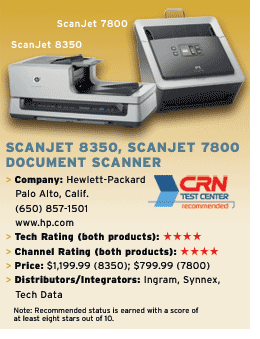
The ScanJet 8350 also has a copy button that automatically sends a scan to a designated printer, and it sports a 100-page automatic document feeder, double the capacity of the 7800.
A legal-sized flatbed scanner, the ScanJet 8350 has a built-in transparent materials adapter that allows 35mm slides and negatives, medium-format film and 4 x 5-inch film to be scanned. Multiphoto support allows up to three photos, eight slides, or 18 negatives to be scanned at once and saved as separate files.
More space will be needed for the ScanJet 8350, which measures 24.61 inches wide, 16.34 inches deep and 10.43 inches high and weighs 33 pounds.
For VARs, HP offers the three-level PartnerOne channel program, which has Business Partner, Gold and Platinum designations.
Business Partners simply must sign a business development agreement and complete a basic sales course. Gold members must do the same plus have at least $5 million in annual revenue. Platinum has the same requirements as Gold, but must also have $25 million in annual revenue. Training is available at no cost.
All PartnerOne members take part in demand generation, certification and compensation programs. Gold members get that plus MDFs and dedicated HP sales support. Platinum members also are eligible for a dedicated marketing consultant. Demo and rental units are available. Other benefits include sales rebates, influencer fees and SPIFs.