NEC's MultiSync PA301W Monitor Shines
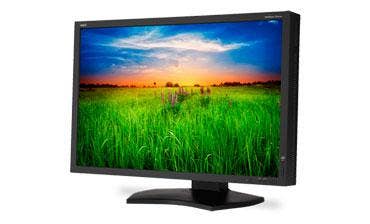
And the Oscar goes to...
The Academy of Motion Picture Arts and Sciences doesn't issue awards for display monitors, but those aspiring to the academy's Scientific and Technical Awards will undoubtedly have used technology that's inside the MultiSync PA301W monitor from NEC Display Solutions. Its 14-bit 3D lookup table (LUT) is used in the film industry to predict how colors will appear when projected onto the silver screen.
And for graphic designers, art and production staff, photo editors, and all manner of digital artists and other mortal professionals for whom color accuracy is critical for output, there's no better technology today than the 10-bit color palette in use in NEC's high-end digital display. It displays more than 93 percent of the NTSC's color gamut at 98.2 percent of Adobe's RGB gamut.
The technology was obvious in grayscale and color gradient tests, where absolutely no banding was visible when viewing the CRN Test Center's standard test images; shading transitioned from full to none as smoothly as could be. We dare you to try that with your monitor; we can almost guarantee that you'll see banding when you click this page.
But not with the $2,299 MultiSync PA301W, whose IPS panel drives a native resolution of 2560 x 1600 with absolutely no color and contrast distortion at all but the sharpest viewing angles. The all-digital monitor offers four inputs in all; two DVI-D (dual-link) and two DisplayPort. There's a dedicated (and proper) input button; no need for a ridiculous trip to the menu.
There are no HDMI or VGA ports. But NEC makes up for that in spades with a built-in KVM switch, a feature we've praised on other MultiSync models. Why is this useful? These days, it's common for people to use multiple PCs with a single monitor. But what about the peripherals from those PCs? NEC's built-in USB switch automatically transfers the keyboard and mouse connections to the PC that's currently being viewed. Brilliant, right?
Next: Checking The On-Screen Display
And while there's no need to visit the menu for switching video inputs, we liked the PA’s on-screen display and the way it's controlled. When the OSD is active, on-screen labels appear near the monitor’s physical controls, which wrap around lower right portion of the bezel. This simple little trait pretty much eliminates wrong navigation and accidental resets. There's also a feature that compensates for long cable runs.
The unit is on the bulky side at 18.5 inches high (minimum) x 27 inches wide and 10 inches deep at its base. The pedestal stand raises the panel effortlessly to its maximum height of 24.5 inches in landscape mode. Pivot the monitor to portrait mode and a clearance of 29.25 inches is needed.
The PA301W also is a bit power hungry, consuming about 90 watts during normal usage. The monitor offers two "Eco mode" settings, which reduce screen brightness and power consumption. In normal mode, brightness by default is set to 220 cd/m2. In Eco Mode 1, brightness is reduced to 200 cd/m2 -- an almost undetectable amoun t-- and power usage drops to from 90 to 86 watts. Eco mode 2 drops usage to 66 watts and brightness to 100 cd/m2, a level that was a bit on the dim side for our liking. In power save mode (when the source PC is off), less than one watt was detected. Most others we've tested consume at least one watt in power save mode. The units runs relatively cool, measuring 98 degrees at its hottest point (at the top of the panel). Its weight with the stand is 41.5 pounds.
For color accuracy, the MultiSync PA301W will be hard to beat. At a list price of $2,299 with DVI-D and DisplayPort cables and a four-year warranty that includes the fluorescent back light, customers will have a specific need for its capabilities. And for such customers, the CRN Test Center recommends the NEC Mylti-Sync PA301W. Options include a monitor hood and color calibrator.