Review: Samsung Shows the Promise of Mobile Device Printing
With a company like Samsung, which manufactures smartphones, tablets and printers, you had to believe it was only a matter of time before they got it all working together. With Samsung’s SCX-4729FW and free Mobile Print app for both Android and iOS, the company has now done it.
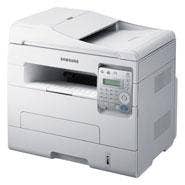
The CRN Test Center had the opportunity to evaluate the SCX-4729FW, a black-and-white desktop multi-function printer. The Wi-Fi-capable network device set up in about 10 minutes on our wireless network, and within a few minutes of that we were able to begin printing from mobile devices, a MacBook Air and a PC running Windows 7 professional.
As a standard enterprise printer – think small office or workgroup – it’s priced somewhat competitively at $399. It’s small footprint makes it a nice desktop printer, and not a problem to lift out of the box and set up. (At about 29 pounds, one person should be able to lift and set it in place.)
From a cold start, we stop-watched the SCX-4729FW at 22.7 seconds time to first print; from there, it printed a six-page document in 12 seconds. That’s fine for this price point in a desktop printer.
The copy function of the device worked flawlessly, copying a document in less than three seconds – and with the multi-page feeder, it was able to copy a 10-page document in 20 seconds. The scan-to-PC function was similarly outstanding. After installing the MFP management console (from CD) onto the PC, scanning from the SCX-4729FW – via Wi-Fi on the network – worked amazingly. In both black and white and color, pages took about four seconds to scan wirelessly over the network to the PC running Windows 7.
Additionally, scanning documents from the SCX-4729FW via the Wi-Fi network to mobile devices worked fantastically. While apps for both iOS and Android exist for turning devices into scanners themselves, scanning from the SCX-4729FW to the device provided much greater quality.
Where Samsung adds value with this printer is in its introduction of straightforward Wi-Fi support and support for printing from mobile devices.
Though it’s not perfect, Samsung is providing a very nice first step in mobile printing.
We downloaded and installed the Samsung Mobile Print into an iPad, an iPhone and and the Samsung Galaxy Tab 10.1 running the Honeycomb version of Android. Here’s what we found:
NEXT: Using Samsing Mobile PrintOn both the iPad and the iPhone, we were up and running printing photographs straight from each device. However, when we wanted to print documents from the phone or the tablet, the app told us we needed to upload the document to the web first – but then provided no additional information. We found a workaround by copying the document to the clipboard and printing from that. On the Galaxy Tab 10.1, printing documents from Google Docs was a snap, as well as printing photos.
Samsung is very close to real, unmitigated breakthrough mobile device print support. The support it provides now is as good or better than any other print support for mobile devices on the market.
The browser-based administrator console was straightforward yet robust for the price point. Samsung calls this the SyncThru Web Service Embedded Web Server, and provides all the requisite details about the device: amount of pages printed, amount of toner remaining, Fuster life, Transfer roller life, for example, as well as providing the ability to print the system log for information about performance, errors and more.
We believe that, because of its unique position as both a printer manufacturer as well as a manufacturer of smart phones and tablets, Samsung could become a leader in mobile device printing. Given Hewlett-Packard’s missteps with the now-defunct HP TouchPad line, and Apple’s lack of significant background in printing, Samsung is positioned to make a clear-cut case that it is the solution for mobile device printing.
However, we need to see Samsung support printing of .doc, .xls and .odf files before it can truly lay claim to that brass ring. For now, though, the SCX-4729FW can provide rudimentary mobile print support while, in its own right, serving as an outstanding multi-function printer.
There are many reasons to like the SCX-4729FW (though naming convention isn’t on the list.) For years, Samsung has been attempting to position its printers as a second, third or fourth option for enterprises – which struck us as odd because of Samsung’s long reputation and well-known brand name in technology.
With this multi-function printer, though, it’s clear that Samsung has come ready to take market share in the SMB and workgroup space, and its work so far (though unfortunately incomplete) in mobile printing means this company should be considered a threat to its competitors. Samsung is showing us a glimpse of the future of mobile printing in the enterprise, and through the SCX-4729FW and Samsung Mobile Print App, it has gotten our attention.