Printer Review: Canon PIXMA MX892 Wireless Inkjet
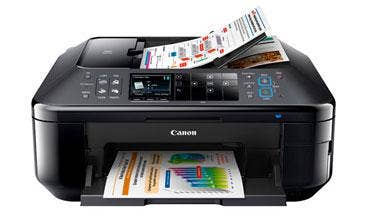
For small-office situations where good-quality color printing trumps high-speed output, the Canon PIXMA MX892 Wireless Inkjet all-in-one printer is worth considering. For $199 list, the MX892 delivers two-sided color scanning, copying and printing, wireless and remote printing from mobile devices, and brilliant edge-to-edge color output rivaling much higher-end equipment. But with a relatively low paper capacity and cost-per-black-page north of 5 cents, this PIXMA model is clearly not for every situation.
Out of the box, the glossy, black finish of the MX892 makes an impression, as does its multipurpose control panel buttons. Thanks to clever backlighting, the buttons appear as arrow keys (shown) for controlling some printer functions and as number keys for performing numerical functions such as dialing a fax. Impressions continue when the printer's front door automatically opens to reveal output as it enters the lower tray. The unit occupies about 18 inches by 19 inches of desktop space and stands less than nine inches tall, but with its rear feeder and front door open, will require about 13 inches of vertical clearance and about two feet from front to back.
Constructed like a layer cake with rear hinges, the unit's sheet feeder assembly lifts on a spring hinge to reveal a flatbed scanner and copier glass, onto which as many as 35 originals can be fed, flipped over and copied on their reverse side. With the feeder closed, the scanner bed can be lifted and remains up with a plastic bar that's hinged on one side. This reveals the ink heads and cartridge assembly, which moves to maintenance position for installing or swapping out any of its five ink cartridges. To close the scanner bed, simply push the bar aside and it retracts automatically as the assembly gently lowers on its dampened hinges. After unpacking, the printer was set up and ready to use in about five minutes.
NEXT: PIXMA Performance
Being fans of Canon's line of digital SLR cameras, testers were most interested in evaluating the PIXMA MX892's adeptness at printing digital images. With its 4,096 color nozzles, the MX892 can produce a maximum resolution of 9,600 x 2,400. We were not disappointed. When printing a series of high-resolution test images, color gradations were continuous and there were absolutely no signs of pixelation or dithering.
But it certainly took its time; 4-inch-by-6-inch printouts took about a minute on average, and about twice that for 8-x-11 images. Canon estimates the cost for color printing with the MX892 at about 13 cents per page and rates color print speed at 9.3 pages per minute. In addition to its dye-based inks for CMYK, Canon employs a second pigment-based black ink cartridge for black-only printing to improve cost effectiveness. Its 512-nozzle black-only nozzle spits out a maximum resolution of 600 x 600 dpi at a rated speed of 12.5 ppm.
In addition to support for Apple's AirPrint (for printing from iPads and such) and Google Cloud Print (for direct printing of Google Docs), Canon also includes PIXMA Cloud Link, which permits printing through Google Cloud Print to the MX892 (or any other PIXMA Cloud Link-enabled printer) from any Internet-connected device. The feature works with Picasa and other web-based picture services and templates for printing directly to the MX892 without a computer.
Other software permits sharing the printer with anyone anywhere, and printing of pictures and movie frames from Canon cameras directly or through a series of photo filter effects such as miniature, fisheye and soft focus effects. The MX892 also can print from or scan to just about any type of memory card or stick, including USB, SD, microSD, miniSD, SDHC, xD-Picture Card, Memory Stick (all types), MMC and even CompactFlash.
For the small office, the Canon PIXMA MX892 Wireless Inkjet all-in-one printer with its Ethernet, USB and Wi-Fi interfaces (plus a Bluetooth option) is versatile enough, but its cost-per-page is a bit high and its paper capacity is a bit scant. It holds 150 sheets in the main cassette plus another 150 in the multipurpose feeder. But for $199, the MX892 delivers great quality color printing and would be a good MFP choice for organizations that don't rely too heavily on large volumes of printed materials.
PUBLISHED APRIL 23, 2013