Review: Lexmark CX410de Color Laser Multifunction Printer
	
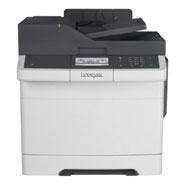
Unorthodox doesn't always equate with inferior. Despite an output tray that discharges in the rear, the Lexmark CX410 Multifunction Color Laser Printer is far more than a glorified fax machine. And its trayless multipurpose input feeder, which handles just a single sheet at a time, still seems a clever and pragmatic way to save space and improve ease-of use.
Introduced in October, Lexmark's latest CX410-series of laser MFPs combine printing, copying, faxing and scanning, all in brilliant, high-resolution color with a maximum-rated output speed of 32 pages (or copies) per minute and around 11 seconds to first page. Its $699 starting list price and rated duty cycle of 75,000 pages per month place the 410 series squarely in the small-business space. For testing, Lexmark sent the CX410de model, which integrates a duplex unit and lists for $799.
Setting up the CX410 was a fairly standard affair, but we did get a little sidetracked when one of the unit's side panels fell off as we were removing shipping tape and tabs. During the printer's first-time setup routine, the display 4.3-inch color LCD touch panel presented choices for time zone, language, features and for which shortcuts to put on the home screen. This latter feature was of particular interest, and included choices for placing shortcuts to email addresses and FTP servers, as well as the ability to change the on-screen language and quickly access the USB drive (the only option enabled by default).
A single disk carries software and drivers for Mac OS X and Windows. Both present guidance (that can be skipped) for unpacking and first-time printer setup, and both installers are fairly well integrated with their host platforms. At one point during the Mac install, a button was presented to launch Apple's "Print & Fax" System Preference panel, along with directions that were not quite accurate but close enough. The Windows routine got us all the way there, recognizing the networked printer and adding it to Windows as the default. Total software setup time for either platform was about five minutes.
NEXT: Printing Performance And Quality
	

The Lexmark CX410 Multifunction Color Laser Printer is rated to print letter-sized pages at a maximum rate of 32 ppm, regardless of color or black, with a maximum time-to-first-page of 11.5 seconds.
In tests, the printer held up its end of the bargain on rate, but fell behind at the outset. When printing a single page with black text and a color graphic, the CX410 required 43 seconds to get the job done. We repeated the test several times to eliminate engine warm-up, but the best time we got to for first-page was 33 seconds. Color copies were made with two screen taps ready for pickup in 15 seconds. On multiple-page jobs, the printer again needed a minimum of 26 seconds to display the "busy" signal on the panel and another 8 seconds to spit out the first page. A 32-page report -- regardless of color -- took a total of 1:36.
Though not the fastest printer on the block, there's a lot to like about the PCL -- and PostScript-capable CX410. A USB port on the front panel accepts walk-up print jobs without a computer; a directory of the USB drive pops up on the panel and displays compatible files for selection by swiping the roomy touch-sensitive screen and printing one graphic or PDF at a time. The interface also permits images stored on the USB stick to be shipped off to a network server or email address.
The CX410's 600-x-600 dpi scanner is fed by a 50-sheet auto feeder that handles roughly 14 ppm with duplex or about 30 ppm without. Scans can be stored to USB or network server, or sent via email. In-device image options include color correction and edge-erase. While running a print job, the panel displays a large "Cancel" button along with a page counter. Mobile-device printing is available through Lexmark's Mobile Printing app for Android and iOS. The unit's IP address is displayed at all times, helpful to people using the mobile printing app, since they'll need to input it manually.
For a list price starting at $699, the Lexmark CX410 Multifunction Color Laser Printer is a solid choice from a company known for making high-quality office machines.
PUBLISHED ON MAY 16, 2013