Test Center Review: Samsung's Nexus S -- A Major Leap Forward
The beauty of Samsung's Nexus S -- unveiled in December -- is more than skin deep. From its shiny black (or white) plastic case to its curved-glass screen, the Nexus S is simply a great looking phone. Underneath is Samsung's 1GHz Hummingbird processor running Android 2.3, the latest version of Google's mobile operating system that finally gets most things right.
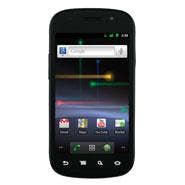
A result of joint development between Google and Samsung, the Nexus S is the first phone to be available with Android 2.3, the so-called Gingerbread release, and is unadorned with overlays of any kind; it's pure Android. Sweet indeed, Gingerbread presents a dramatically improved experience from prior Android versions, and fixes many of the flaws that we've been grousing about. And Samsung's four-inch (800 x 480) active matrix organic LED (AMOLED) screen is one more thing that the iPhone doesn't have. The Nexus One, Samsung's prior Nexus model, was made by HTC.
Upon firing up this little beauty, the first thing we noticed here in the CRN Test Center was a feature called live wallpaper. This presents animated patterns in the background, such as colored lines shooting up and down and all around, cloud bursts, waves of grass or Google Maps. Soon after we learned that live wallpaper drains more battery power than dead wallpaper, we killed it.
The next major enhancements we noticed were to Android's soft keyboard. This vastly improved widget now presents larger keys, all but eliminating the erroneous key presses that would send us to the hardware keyboard on other models. It's also multi-touch capable, meaning that while one finger holds the shift key, another can enter as many capital letters as are needed. Spelling suggestions still appear as characters are input.
Testers noticed a huge performance increase in Android 2.3. Applications launch more quickly, icons and settings commands execute immediately and searches appear almost instantaneously. When we deemed Gingerbread one of the 10 Coolest Open Source Apps of 2010, we noted that performance advances were largely a result of better garbage collection and optimized event handling.
Its new application lifecycle management framework is apparent; apps and their services can be stopped and/or removed from a newly designed App Manager with tabbed interface that sorts by those downloaded, installed on USB and currently running. The "what's using the battery" widget also presents more granular information and control.
Now that Gingerbread can accept gyroscopic input, Samsung was all too happy to include not just a gyro sensor, but an accelerometer and digital compass too. The unit automatically (and quickly) rotates the screen based on the orientation of the Nexus S in any position except upside down.
The Nexus S is equipped with two cameras (one of which collects five megapixels and includes a macro setting; the front-facing camera grabs 640 x 480), and its redesigned camera app is more intuitive than prior versions, is aided by an LED flash and includes multiple gallery modes. Also supported are AAS and AMR-wideband decoding, as well as SIP and VoIP protocols. Video capture maxes out at 480p (30fps), but 720p playback is supported. The browser supports Adobe Flash 10.1 for accessing Web content.
Despite Gigerbread's new reverb and equalization enhancements to its audio capabilities, the music player app itself is largely unchanged. There's still no equalizer, and the interface is not particularly intuitive or easy to use. However, Samsung includes an excellent headset, with rubber earplug-style ear buds that block outside noise. The answer/hang-up button doubles as a pause switch when listening to music; it does not skip to the next song when double-pressed as we've seen on other models. For music, the headphones deliver great sound with plenty of bass.
The bottom edge of the phone is home to a microUSB port and 3.5 mm headset jack. Whenever the Nexus S is connected to a computer, the green Android appears with the opportunity to turn on USB storage. This exposes the Nexus S's 16 GB of user memory to the PC or Mac for file transfer via drag-and-drop. On other Android phones we've tested, we had to removed the device's SD card, manually transfer files from a machine equipped with an SD card reader and then reinsert the card into the phone. Obviously, the USB storage function saves an enormous amount of time.
Perhaps the most significant improvement in Android 2.3 is its power efficiency and the resulting extension to battery life.
While admittedly unscientific, our baseline for battery life is a G1 phone from HTC, which gets about 10 hours of standby time or about two hours of talk/media playback time. That phone is running Android 1.6 on a Qualcomm 528MHz MSM7201A processor. The Nexus S gave us a full day of testing, phone and media player use and Internet browsing, and still had about 14 percent to spare.
Also vastly improved is the phone app. Upon launch, the default tab is the dialer, as we believe nature intended. And no longer does one have to visit the menu to invoke the speakerphone, dialer, Bluetooth and mute functions, all of which now have dedicated buttons where there used to be blank space. Also, phone contacts, calendar items and email all sync properly now; Android 1.6 on this account was an epic fail.
Communications capabilities in the Nexus S: 2.5G, 3G (HSDPA 7.2 Mbps HSUPA 5.76 Mbps), WiFi 802.11 b/g/n, Bluetooth 2.1 +EDR, Near Field Communications, A-GPS, and USB 2.0. Audio decoding: MP3, AAC, AAC+, eAAC+, AMR, AMR-NB. Samsung 1GHz Hummingbird (with ARM Cortex core) processor, 512MB system memory, 16GB user memory.
The Samsung Nexus S has a street price of around $529, and is available for AT&T and T-Mobile networks. And for solutions providers seeking a development platform that's pure and free of carrier-built functions, the Nexus S is an ideal choice.