GammaTech's DuraBook: Priced To Move
Construction sites, mechanic's shop, lumber yard, hospital, battlefield: these are a few of the locations that call for so-called ruggedized mobile computing solutions. These are systems that resist mishaps relating to shock, spills, dust, dirt, humidity and other hazards of every day life. For solution providers, there's no shortage of durable laptop computers to consider as part of a customized solution. But which one is right for your business?
The CRN Test Center has looked at numerous rugged notebooks over the years, and they usually impress us with their suitability to task more so than with their price. Offering both is the DuraBook line of rugged, value-priced laptops from Silicon Valley-based GammaTech Computer Corp.
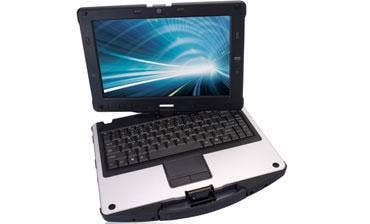
For this review, GammaTech sent the DuraBook U12C, a convertible unit that's built around a 12.1-inch WXGA touch-sensitive LCD pane. Models are available with 13-, 14- and 15-inch displays and a variety of processors, storage and connection options. The high-end U12C is equipped with an Intel Core i5 (U560) dual-core 1.33 GHz processor and was running the 64-bit version of Windows 7 Professional from a Kingston solid state hard drive on 4GB of DDR3 memory (8GB is the maximum for the unit's two 204-pin slots). As tested, this system lists for $1,921, about half that of a comparably equipped unit from Panasonic, the 800-pound gorilla of the rugged notebook market.
The first thing we noticed about the U12C was its two-stage lid clasp, which works something like that of an old-fashioned jelly jar. Slightly primitive perhaps, but after converting to tablet mode, where the same clasp is used to secure the screen on its flip side, we realized the efficiency of this simple and clever design.
Also sturdy is the swivel mount, which holds securely the screen's 1280 x 800 native pixels. The screen can tilt and remain at any angle between zero and about 180 degrees (flat). It also swivels on a central pivot point 180 degrees and can tilt to any angle anywhere along the way. Riding along on the bezel are the 1.3 megapixel Web cam, fingerprint scanner, and dedicated controls for system power, screen brightness and rotation, workstation lock, screen/sound hide, media player and customizable menu button. Part of this latter control includes the wireless cut-off switch, which means that it's implemented in software. We prefer that the so-called airplane switch be implemented in hardware.
Next: Checking Performance
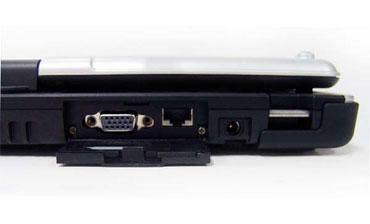
We might have chosen different icons for some of the DuraBook's dedicated controls. For example, the media player button is adorned with a large "P," and the lock-screen button's icon -- a key --looks a lot like a microphone. On the subject of media, the unit's two internal speakers put out adequate sound, though not exceptional. And while screen brightness merited its own controls, audio volume and mute functions are handled with FN keys; a two-handed operation for most mortals.
Not as bulky as some of the rugged notebooks we've seen, the DuraBook measures about 11 inches long, by 12.5 inches wide by 2 inches thick. The rubber handle is not uncomfortable, but it's not as wide as we would have liked, and the 5.6 pound unit (without the optional second battery) might start to dig into one's hand after carrying it for a while. The AC adapter, with its "Mickey Mouse" cord connector, adds about a pound. The tested system was not equipped with an optical drive.
Geekbench performance was on par or better than other systems we've tested that were running at 1.33 GHz. With Windows set for maximum performance, testers observed a maximum score from 64-bit Geekbench 2.1.3 of 3286, that's about eight percent better than an identically configured system from Fujitsu we tested most recently. Battery performance was excellent. Starting with a full change on a single battery, testers set screen brightness to maximum, disabled power saving features and played continuous video content stored on the hard drive. Windows shut down after two hours and 36 minutes.
We hope that one day laptop makers will once again realize that the carry handle benefits the user when the computer is on, almost as much as when it's off. Because mobile computers seldom stay put for very long. Yet such convenience features are usually limited to notebooks designated as tough, ruggedized and shock-proof. Even Apple, long the vanguard of user-friendliness, abandoned the handle years ago.
GammaTech manufactures an array of rugged notebooks, docking stations and other devices for this specialized market at prices that make them attractive as alternatives to name-brand products. The DuraBook U12C looks and feels like it would hold up under extreme conditions, and its fit and finish inspire confidence. The CRN Test Center recommends the GammaTech DuraBook U12C.