Review: The Motorola ES400 Enterprise Digital Assistant
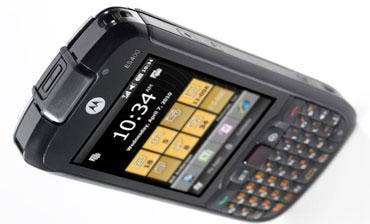
Things move incredibly fast in the mobile device arena. When the Motorola ES400 Enterprise Digital Assistant was released almost a year ago, Microsoft's Windows Phone 7 was not yet shipping, and was therefore not available as a platform for Motorola's smallest rugged mobile device to date.
Instead, the candy bar-style device uses Windows Mobile 6.5.3 Pro, which still looks like it would be most easily controlled by a mouse. Pity. Because when held up against the finger-friendly smart phone operating systems of today, using a stylus seems down right prehistoric. Then there's the ES400's 600MHz ARM 11 processor, which next to the dual-core Hummingbird 1GHz processor found in the latest Samsung Nexus S mobile phone, seemed sluggish and was often unresponsive to touches.
Still, the idea behind the ES400 was to enable the enterprise to provide its workers with a single device to perform any and all tasks that might be required. To that end, Motorola did a splendid job, both with hardware and software. The ES400 delivers a ton of functionality in a rugged and durable device that will make an ideal development platform for solution providers servicing health care, retail, field sales and service and many other industries.
For devices on the job, durability is critical. The ES400 is rated to withstand multiple drops and tumbles (MIL-STD 801G), and is built to repel dust, moisture and rain (IP42 ingress protection rating). Longer lasting devices reduce total cost of ownership and increase worker productivity and customer satisfaction. Even better is not to drop the unit at all, which testers believed was aided by the unit's rubberized grips all around.
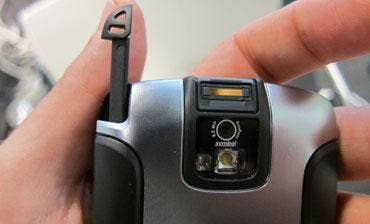
A 3.2-megapixel auto-focus camera doubles as a digital imager and bar code scanner, capable of reading and decoding 1D and 2D codes. A dedicated scan button interrupts any application that's currently running and pops up a video window and shines its LED light on the code being scanned. Testers were impressed with the camera's ability to automatically focus quickly on the subject, and scan and decode the bar code. This is accomplished all within two to three seconds. The application that's doing this, called DataWedge, is disabled by default, as is the bar code reader itself. Both are activated in the Settings app.
Next: Motorola Includes Enterprise User Interface
To simplify the provisioning of custom applications using the ES400, Motorola includes the Motorola Enterprise User Interface, which is essentially an app launcher that's easily customized and populated with apps. Important or frequently used apps can be placed front and center where they're easily launched with the touch of a finger or stylus or highlighted and activated using the center button, which works like a kind of mini-trackpad.
Motorola says its phone works on the Sprint CDMA EVDO U.S.-based network, which in terms of speed is between 3G and 4G (a.k.a. 3.5G), but it also has a GSM /HSPA radio, and will work elsewhere in the world, but at 3G speeds. There's also a WiFi radio with push-to-talk and and voice over IP capability. Some clever software allows the user to "toggle" between the two networks easily.
The PenTile screen (from Samsung) is extremely bright (it's rated at 750 nits), and is purported to be far more power-efficient than conventional LCDs. The standard Lithium Ion battery is rated to provide six hours of talk time and 250 hours on standby. An option of extended battery doubles those specs. We charged the unit once, ran it continuously for several days and still had 87 percent battery life remaining.
While reviewing Motorola's ES400 Enterprise Digital Assistant all-in-one mobile device, an old phrase kept coming to mind: "Jack of all trades, master of none." What we found was to the contrary. The ES-400 performs some tasks masterfully, such as scanning and processing digital data, holding up to rugged treatment and displaying brightly for long periods of time. And while its outdated operating system and underpowered application processor caused it to stumble here and there, its performance for the most part was solid. We look forward to watching this device evolve.