Review: The Lenovo ThinkPad Tablet
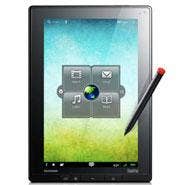
Lenovo’s vaunted ThinkPad franchise, which entered this world as an IBM product and wound up with Lenovo when it bought IBM’s PC business in 2004, hasn’t made much in the way of radical departures of any kind in the past decade.
Built in basic black, with the red Trackpoint button and designed primarily for the enterprise rather the consumer space, the ThinkPad has been a staple of Fortune 500 businesses and a stalwart product for Lenovo channel partners. So when it became clear throughout the market that more IT dollars would be spent on thin-and-light tablets, Lenovo got to work adapting the ThinkPad to the new use patterns and market for the new form factors.
So here we have the Lenovo ThinkPad Tablet, which Lenovo unveiled in August and has now made available for review. We’ve had the opportunity in the CRN Test Center to review most of the major tablets launched to market through the channel this year, and Lenovo launched its tablets only after competitors like Apple, Toshiba, Fujitsu, Acer, Samsung, Viewsonic, Hewlett-Packard, Research In Motion and others launched theirs. We were curious to know whether the additional time Lenovo took to launch the ThinkPad tablet made a difference.
The ThinkPad Tablet we reviewed was built with an Nvidia Tegra 2 dual-core processor at 1.00 GHz, a 10.1-inch WXGA display with Corning Gorilla Glass, and native USB 2.0, Micro-USB, and full-size SD card slot, with a mini HDMI output. The hardware specifications are in line with what an enterprise would find acceptable.
On the CRN Test Center scale, the ThinkPad Tablet weighed in at one pound, 10.8 ounces. It’s a thicker device than competing tablets like the iPad 2 and the Samsung Galaxy Tab 10.1, but that’s the tradeoff with the number of media ports built into the device.
Lenovo pre-loaded the tablet with Android 3.1, which enterprises are still mulling – given the plethora of valid concerns over security for the open-source platform that was created by Google. However, Lenovo has taken a few approaches to make the platform more appealing to the enterprise – namely creation of the Lenovo App Shop, an online store of Android apps that have been vetted, quality-tested and security-tested by Lenovo.
It’s not a bad app store, either. For example: Lenovo presents a number of solid productivity apps, including PDF readers, business card scanners, signable document creators and texting apps. For anyone who has waded into the deep and unknown waters of the Android Market, the Lenovo App Store is just an absolute welcome development.
But that’s not the best part of the Lenovo Tablet. There are three stellar features to this tablet that separate it from others: its digital pen; its selection of pre-loaded apps; and the customized GUI.
NEXT: The ThinkPad TrackPoint Retrofitted When we first saw that Lenovo had included a digital pen with the tablet (complete with a red cap, to emulate the legendary ThinkPad Trackpoint), our first question was: okay, if it has a digital pen, does it also have a floppy drive?
Frankly, one seemed as obsolescent as the other. But Lenovo has taken the digital pen into the new tablet era, and has done a great job. In particular, the use of the digital pen with a pre-loaded app, MyScript Notes Mobile, is a breakthrough in tablet-based note-taking. The pen and the app, combined, do what we’ve seen other solutions try and fail for the last decade: simulate the traditional pen and notebook. (Notes Mobile, by the way, does a nice – seemingly effortless - job of converting handwriting into digital text.)
The pre-loaded apps, including Notes Mobile, were almost all good choices. From Docs to Go to Citrix Receiver, from McAfee Security to Google Talk, the pre-loaded apps ensure the tablet is ready for work right out of the box. This is an area where even the better tablet makers have been a little hesitant; but Lenovo’s effort shows that a manufacturer can pre-load basic, effective apps (for tasks like word processing, security and communication) without forcing unwanted bloatware into the box.
Additionally, the ThinkPad Tablet is pre-enabled with Absolute Software’s Computrace- to provide a “persistent connection” to the device in case it’s lost or stolen. While other tablets support “find-my-device” and remote wipe and lock apps, the pre-enablement of Computrace is a very nice touch.
And Lenovo has cleaned up the Android 3.1 GUI, and developed a feature called the “Zone,” a butterfly-like navigational device on the home screen that will support pre-loaded buttons for features including watching video, email, e-books and music – as well as launching the device’s browser. Additionally, Lenovo has created a sort of “wonder wheel” to navigate (by touch) screens and apps.
Like competing tablets, the ThinkPad Tablet is built with two cameras – a front-facing camera and a rear-facing camera for both video and still images. (The cameras also support scanning documents to PDF or bar-code scanning.)
And, like competing tablets, the ThinkPad Tablet is built with a GPS antenna. We found its ability to pinpoint location to be accurate within about 10 yards. The built-in Lenovo file navigation system is also one of the best we’ve seen in an Android device to date – making it easier and more intuitive than ever to locate documents, photos, music, video or presentations.
If there is a downside to the ThinkPad Tablet, it’s the on-board speakers; the audio was much softer than we’re used to from tablets and was actually softer than the speakers built into the iPhone 4.
Other vendors have released tablets after falling behind companies like Apple and Samsung, which have launched mega-successful and very successful tablets, respectively. These vendors have had varying levels of success with one, Hewlett-Packard, failing so badly that it wound up getting out of the business after six weeks despite having a unique operating system in WebOS.
What makes Lenovo’s effort a successful one, and worth the wait, is that it is exactly what an enterprise could use in an Android tablet: a secure, QA-tested, differentiated tablet that comes in at a competitive starting price point of $499.
The Lenovo ThinkPad tablet is a great tablet for business, and a device that you can can actually work on and one that would make a smart introduction for enterprises into the tablet world. The CRN Test Center can recommend this device strongly.