Samsung Galaxy S2: Pure Power In Black And White
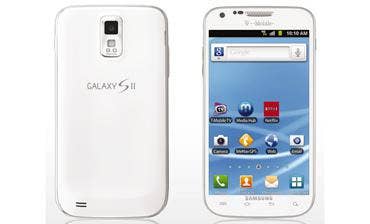
On the heels of CRN's 10 Coolest Smartphones of 2011 slide show this week, Samsung sent the CRN Test Center a sample of its model SGH-T989, the Galaxy S2 for T-Mobile networks that's even more powerful than the Exynos-based Galaxy S2 featured in the story.
Samsung's Galaxy S2, available in white starting today (black units have been shipping since October), embodies the state of the art in smartphone hardware and software. The T989 is built around a 1.5-GHz dual-core Scorpion processor, Adreno 220 GPU and Snapdragon APQ8060 chipset from Qualcomm. Collectively, these circuits are known as the Snapdragon SoC, made by Qualcomm.
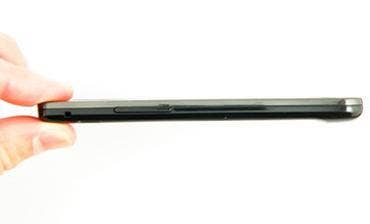
At 5.1 x 2.7 inches, Galaxy S2 is about a third of an inch longer and a quarter-inch wider than the Galaxy S, and the S2's screen delivers a full half-inch more screen real estate. Amazingly, it's also two-tenths of an inch thinner (at 0.37 inches) than the Galaxy S, yet delivers 50 percent more computing power than its smaller cousin's 1 GHz dual-core CPU and double the internal RAM capacity (up to 32GB).
Even more impressive is the upgrade to TouchWiz 4.0, the latest version of Samsung's UI overlay. We're not generally fans of the vendor-specific user interface, but TouchWiz does add some great functionality and usability features.
For example, while the seven-panel desktop can be paged with finger swipes as usual, it also can be perused using a scroll bar that appears when long-touching the page indicator, or tiled as seven mini-panels (a la Mac OS X's "All Windows" function) that can be dragged around and touched for direct access. This latter function is activated with a two-finger twist on any panel. We discovered most of these new features by accident, further evidence of Samsung's intuitiveness of design.
Long-touching a blank portion of any panel shrinks the still-scrollable panels and brings up shortcuts to controls for adding Widgets, shortcuts, folders and for changing wallpapers. When deciding where to place objects on a panel, dragging the object near the edge of a panel brings up the next panel, as does moving the phone itself. In other words, to navigate between panels while dragging an object, one has only to change the Galaxy's direction; the panels move accordingly.
Also new in TouchWiz 4.0 is tilt-to-zoom. Place two thumbs on the screen and tilt the phone toward you to zoom in, and away to zoom out. Pretty nifty. Prompts appear occasionally with reminders about this and other features new in TouchWiz 4.0, which also includes an improved widget drawer, resizeable icons and access to the gyro.
When dragging down the notifications panel, the new on/off buttons for the oft-toggled WiFi, Bluetooth, GPS, sound and auto-rotation are a welcomed convenience. Enhancements to the phone dialer include larger in-call controls and a contact listing as phone numbers are entered into the keypad.
A Task Manager lists all open apps, each with a kill button, plus a control to purge the RAM. For Android users, this is an extremely handy alternative to restarting every few days to quit performance-sapping apps and refresh the RAM. The environment also provides direct access to files and folders.
NEXT: Battery Keeps Going and Going... We were impressed with Galaxy S2's battery life. Starting with a full charge, we ran the unit for eight solid hours before being prompted that the bettery was running low. During this time, screen brightness was set to auto (adjusted according to input from the unit's light sensor), WiFi radio on and active, the GPS radio on and activities including talking on the phone, browsing the web and playing games with intense graphics and sound. The Bluetooth radio also was on for about four hours during this time.
The first battery warning appeared when there was 25 percent of battery charge remaining. At that time the Galaxy S2 dimmed the display and disabled the backlight for the bottom row of hardware buttons. The system continued to run for another forty five minutes before another warning was displayed, this time with five percent charge remaining. Within 15 minutes, the system was out of gas. It recharged in six hours.
Larger than most, the Galaxy S2 is a beautiful phone. Its 800 x 480 Super AMOLED Plus display is large (4.52 inches), bright, crisp (206 ppi) and made of tough Gorilla Glass. It's available with 16 GB or 32 GB of internal storage, and can address an additional 32 GB on a microSD card. The system includes 1 GB of system memory; boot time was measured at 25 seconds. A dual-function port on the bottom edge accepts a micro-USB cable for data and charging or an optional Mobile High-definition Link (MHL) cable for 1080p output to a monitor or television.
An eight-megapixel (3264 x 2448 pixel) main camera with auto-focus and LED flash also can capture 1080p video at 30 fps. There's also a 2MP front camera, WiFi Direct plus a/b/g/n, Bluetooth 3.0, GPS and playback of DivX, XviD, WMV and other major video and audio formats. The 3.5mm headset jack is on top, but the internal speaker puts out surprisingly and clear audio. A mesh-textured plastic back panel gives the unit a decent amount of stickiness and pops off easily for access to battery, SIM and microSD cards.
Versions of the Galaxy S2, an amazing feat of electronic engineering, are available for AT&T, Sprint and T-Mobile 3G and 4G networks. An unlocked version is selling at NewEgg.com for $549. This is a product recommended by the CRN Test Center.