Review: Samsung Galaxy Note 8
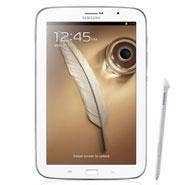
Samsung's Galaxy Note 8 has a few things that the current crop of non-Windows tablets will never have. One is the ability to split the screen between two applications and float a third window on top. Another takes control of media components with its infrared emitter. And, the third is a built-in stylus. When combined, these capabilities add up to increased productivity potential on a tablet that can be just as useful for content creation as it can for content consumption. There's also a hefty price. A Galaxy Note 8 lists for $399 with 16 GB, $70 more than Apple's iPad Mini and double that of Google's Nexus 7 with the same memory.
For review, Samsung sent the CRN Test Center a cream white unit, which looks an awful lot like a larger version of the Galaxy S4 we reviewed a few weeks back. We've heard that Note 8 also will be available in black, brown and red. With its shiny metallic frame, the Galaxy Note 8 is handsome in any color and feels comfortable to hold with one or two hands. Its edges are wide, making accidental presses on the touchscreen less frequent. Galaxy Note 8 is 5.3 inches wide, 8.3 inches long and less than a third of an inch thick. It weighs in at around 12 ounces with 3G/LTE or Wi-Fi.
Processor and interfaces
The Galaxy Note 8 contains a far more powerful processor than most tablets in its class. Like the 10.1-inch Galaxy Note, the Galaxy Note 8 is built around Samsung's Exynos 4412 quad-core system-on-chip with 2 GB of system RAM. The SoC runs its four ARM Cortex A9 application processor cores at 1.6GHz. It's also packing four ARM Mali 400 graphics processors. The Exynos 4412 delivers superior application and graphics performance and zero lag, even with multiple apps displayed.
Many will applaud Samsung's move to replace its proprietary 30-pin connector with the more versatile USB Micro-B plug for charging, file transfer, video and other purposes. But, this relatively small connector is easily bent, and it might concern (or confound) IT departments in the long run. A side-loading microSD slot can add as much as 64 GB for app and data storage. Other external interfaces are a top-edge headphone jack, right-edge power and volume buttons and a single front-panel home key introduced with the Galaxy S3 smartphone.
Also like the S3, menu and back soft buttons straddle that single hardware home button. But unlike previous Note tablets, the stylus can now be used to press the soft buttons. And for stylus users, switching to the finger for button presses is like having to move your mouse hand to the keyboard -- not that big of a deal once in awhile, but a nuisance if required all the time.
NEXT: Stylus, IR, Display, Cams
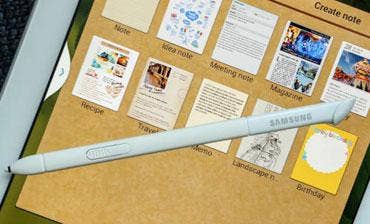
Call us old-fashioned, but we prefer a stylus over a soft keyboard for taking notes. Samsung includes some great pen-optimized software and presents it whenever the S-Pen is removed from its sheath. Where appropriate, handwriting is converted to text, numbers into mathematical formulas and rough shapes into perfectly formed ones. Palm rejection software seems to always be running; the stylus operates consistently regardless of where the hand is resting. And Samsung's pressure sensitive S-pen never requires batteries and brings a high degree of precision to graphical content creation and editing.
Adding exponentially to the versatility of Galaxy Note 8 is the infrared emitter, which opens myriad opportunities for inter-device communications and control. And thanks to some decent software, the IR emitter in seconds turns the Note 8 into a remote control for televisions, cable set-top boxes, audio/video and other electronic components. Companion software also works with cable and satellite systems to tailor content selections and supplement the television viewing experience.
Display and cameras
The 8-inch display on the Note 8 displays 1,280 x 800, the same resolution as its 10.1-inch older brother. The smaller screen size bumps the pixel density up to 189 pixels per inch from 149 ppi. Samsung uses the company's PLS display technology, which it claims can display 100 percent of colors in the sRGB color-space specification and offers 170-degree viewing angles with IPS. It's also about 10 percent brighter than comparable panels, offers better image quality and costs less to manufacture than IPS, according to Samsung.
If only the company had put as much into its cameras. The Galaxy Note 8 includes a 5 megapixel flashless, autofocus main camera. Mediocre by today's standards, it still manages to capture 1080p video at 30fps. The front sensor gathers 1.3 megapixels and can capture 720p video. Both support geotagging for photos and videos.
Software, radios and battery
Samsung has added tons of new functionality to TouchWiz, and fine-tuned the multi-windows feature so it's much easier to use. More apps are now compatible with multi-windowing, and they're grouped in a new drawer that slides out from the left edge of the screen. To create a second window, simply drag the app's icon out of the drawer. Resize the two running apps using the slider that divides the two apps horizontally across the screen. When doing so, a set of buttons temporarily pops up to maximize or quit the current app or flip-flops its position with the other. The 8-inch screen is a good size for viewing and manipulating two apps at once.
Of course, Galaxy Note 8 communicates with dual-band Wi-Fi a/b/g/n, Bluetooth 4.0 and NFC. Models also are available for AT&T, Sprint and Verizon, but not yet in the U.S. It has GPS, accelerometer, gyroscope and ambient light sensors. An updated voice recognition engine worked perfectly to launch apps. After running continuously for 7.5 hours, the battery still had 29 percent of its charge left. The device comes with Android 4.1.2 Jelly Bean.
PUBLISHED JUNE 3, 2013