Netgear's WMS5316 Tackles Wireless Management
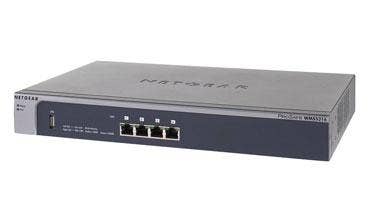
Call it a security flaw, but the CRN Test Center likes the convenience of having a device's default IP address printed right on the underside of its networking gear. Such small touches were a big help when configuring the WMS5316, Netgear's ProSafe Wireless Management System and the Netgear WNDAP350 access point it was managing.
For around $600 on the street, the WMS5316 can manage as many as 16 Netgear access points from a central console, and delivers solid value and convenience for the small-office or department network administrator.
Once connected to the network using one of its four Gigabit Ethernet ports, the WMS5316 automatically discovers and lists only Netgear access points, thanks to some clever Netgear-only filtering embedded in firmware.
The downside to this method is that it requires a firmware update whenever new access points are added to a network; the WMS5316 will be unable to discover them otherwise. A recommended best practice would be to periodically update the firmware. Better still, perhaps Netgear should add a feature that automatically checks for firmware updates.
Admins can select which devices they'd like to manage by clicking that device's check box and adding it to their basic list of managed devices. As a security measure, each device's password would be required here. Once a list of managed devices has been created, they also can be designated as members of groups, and can have settings attributed to them in bulk, or according to departments or any other category.
Once testers adjusted to the Netgear's user interface, they were able to create groups and create and apply settings to members with relative ease. Changes to settings in a group are propagated to members of that group automatically; updated devices are designated as "synchronized" in the management interface. Caution: the existing settings of synchronised access points are overwritten without warning.
The WMS5316 offers some advanced features such as load balancing across multiple access points, settings for maximum number of clients per access point or radio, centralized RF management and channel allocation monitoring.
We also liked the network usage graph, which displays the average transmit and receive rates. Also attractive was the rogue access point monitor, which displays a list of access points on the network, their SSIDs, broadcast channels, communication speeds, the number of beacons and their frequency, and the closest neighboring access point of the ones that are managed. Among other things, this tool can be helpful for minimizing channel interference, man-in-the-middle attacks and other security intrusions.
For the small office with a dozen or more access points, managing them individually can be a real nuisance and a time drain, to say nothing troubleshooting intrusions or RF problems. For companies that have deployed Netgear access points, there's really only one choice: The WMS5316 ProSafe Wireless Management System.