Review: Putting UTM To The Test
The parallel technique seems to be popular because it produces less latency across the UTM technologies. There are shortcuts that can make the process work faster but speedy results sometimes allow nonsanitized packets to pass to users' machines. The parallel technique also allows for cross-checking in case further inspection is required. After inspecting packets across, vendors create their own verification rules. But keep in mind that there are no UTM security standards for evaluating packet streams, so buyer beware.
Methodology
CRN Test Center reviewers selected three midmarket UTM solutions for comparison: Fortinet Inc.'s FortiGate 1000A, WatchGuard Technologies Inc.'s Firebox Peak X6500e and Untangle Inc.'s open-source platform. Reviewers did not run performance tests of midmarket UTM appliances because they are too complex and depend on network interaction, including physical capabilities of each box. Instead, reviewers looked at functionality and configuration capabilities of each solution. Scoring emphasized management, levels of protection and data inspection capabilities.
Next: WatchGuard Firebox Peak X6500e WatchGuard Firebox Peak X6500e
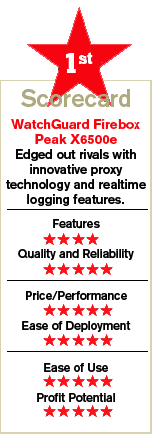
WatchGuard offers one of the most innovative UTM solutions on the market. Its Firebox Peak X6500e comes with advanced capabilities that surpass the other two vendors examined here.
The X6500e appliance comes with tightly controlled default configurations, so solution providers can simply turn it on and deploy it. As tested, the X6500e appliance arrived with inbound traffic shut off and open LAN ports. To get the box up and running, reviewers connected a test PC on the Firebox's trusted port and installed the WatchGuard System Manager client, which collects information from all Fireboxes on a network. The System Manager is the place to go to drill into each appliance.
WatchGuard's approach to creating and managing firewall policies is unique in the UTM space. Because the WatchGuard System Manager client needs to be installed on a remote PC, all of the other monitoring and management tools that come as part of System Manager also work from a remote PC. Policy Manager is one of those tools.
Policy Manager is extremely flexible when troubleshooting live Fireboxes, configuring applications or just experimenting with settings. With Policy Manager, solution providers can also create policies without connecting to live Fireboxes. In fact, they don't even have to be connected to a LAN, so they can take their work home. The configuration files can be saved locally into an XML file. When connected to a box, any changes made to a policy are immediately implemented.
When putting the X6500e into operation for the first time, default proxies and packet filtering rules immediately prevent intruders from snooping on a LAN. The company is careful in striking a balance between what's blocked and what's accepted, so that users are not drastically affected and can do business on the Internet without being disrupted.
However, some behaviors and file downloads are immediately curtailed. Out of the box, the X6500e blocks executables, SCR and CAB files. A lot of the files that are blocked by default are also known to carry malware.
First-time users that need to create a filter rule for HTTP or for other protocols can reuse other filter policies that arrive in the box. The architecture is extensible. Reviewers recommend looking at WatchGuard's System Manager User Guide, which has a list with explanations of all of the default policies. The guide is also important in understanding how proxy policies work.
WatchGuard's proxy policies are unique in the UTM space and go well beyond simple filter policies to protect client and server communication. Proxies use regular expressions to analyze content at the packet level. For instance, a typical HTTP proxy rule can strip out cookies that come from any DoubleClick domain.
With this rule in place, DoubleClick won't be able to track users behind a Firebox. From an administration standpoint, proxy rules save time because they centralize management and eliminate most client browser configuration. Regular expressions can even evaluate browser configurations. For instance, solution providers can create a rule to stop browsers that don't have image viewing turned off from displaying images from Google's search results.
What's more, proxy rules reduce network traffic because they block packet content at the firewall. Web site packets also don't have to travel through other Layer 7 features, so latency is also reduced. WatchGuard's regular expressions also are programmable. In fact, the other two vendors examined here cannot match WatchGuard's proxy programming versatility. The company has fostered a community of solution providers in its forum that trade regular expressions. Solution providers can create proxy expressions that force Internet users to only access certain files on specific directories. The advanced functionality can protect server applications running on LANs that are part of Web applications.
To track traffic information, Firebox System Manager includes a Traffic Monitor tool for managing Firebox appliances. Traffic Monitor is a realtime display of the log coming out of the box. The log information is updated continually as traffic passes through the firewall. WatchGuard's monitoring is unique because it allows solution providers to interact with it in realtime.
Realtime monitoring also helps solution providers respond to end-user requests immediately. For instance, if part of a Web page fails to come up, solution providers can go into the Traffic Monitor and see exactly why a Firebox denied a particular packet. Assuming that an image in the page in question had a virus, solution providers can tell users not to travel to that Web site.
With WatchGuard's Traffic Monitor, solution providers are going to be more aware of network traffic than with most other UTM appliances on the market. The tool can even identify trends in malware such as malicious code hidden in Web pages that are picked up as users download content from legitimate Web sites. This trend is now referred to as drive-by downloads. More important, solution providers can give end users an honest response, something that's rarely done nowadays.
Next: Fortinet FortiGate 1000A Fortinet FortiGate 1000A
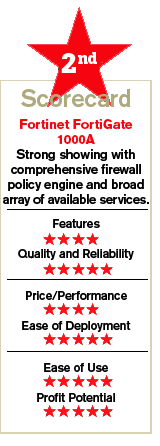
Fortinet's FortiGate 1000A has one of the most comprehensive set of UTM services on the market. While many vendors embed services they have OEMed from other technology partners, Fortinet does everything in-house. It also goes one step further to embed dedicated security chips in its enterprise UTM solutions. The Fortinet chip technology is designed for complex UTM deployments where sanitized traffic can cause unnecessary delays.
Like WatchGuard, FortiGate's UTM policies are derived from its firewall policies. FortiGate can define multiple policies for each of its ports. Essentially, each line item in the firewall interface describes individual policies that define a rule for a physical interface.
FortiGate 1000A's router supports BGP, OSPF and RIP router protocols. With BGP, FortiGate is able to integrate with existing routers. Managed service providers offering UTM services have to know how to create external routing bridges between customers' routers and FortiGate. Connecting routers using BGP is a valuable service that requires expertise. Although FortiGate was not designed to replace a router, it can be used as a standalone router on small networks. The routing features work in conjunction with the other FortiGate services.
Configuring firewall policies takes a couple of minutes. Fortinet has made the firewall interface easy to understand and follow. In addition to port restrictions, FortiGate provides a list of predefined services to simplify the selection process.
These services are common Web-enabled applications such as messaging and peer-to-peer programs, which require external connections through predefined logical ports. If partners cannot find what they need, they can quickly create their own rules.
In addition, solution providers can set up IPSec or SSL VPN tunnels in the firewall policies. Like routers, FortiGate firewall policies provide network address translations (NAT) to hide internal network addresses. The firewall also provides traffic shaping to control network bandwidth that is passing through interfaces. For instance, solution providers can curtail bandwidth going to AOL chat clients and increase it for Web surfing. FortiGate's traffic shaping options guarantee certain bandwidth for services, including what traffic priorities are given to applications.
FortiGate maps firewall services with its UTM services using a feature called Protection Profile. A profile defines UTM services. Solution providers simply have to decide to turn on services such as Web filtering, antispam, intrusion protection and antivirus. Once created, profiles are then applied to firewall policies.
Out of the box, FortiGate comes with predefined profiles to filter content that enters a network. If a customer only wants to run FortiGate's antivirus UTM service, solution providers can simply turn off all profiles except for the one that covers antivirus protection.
FortiGate provides interfaces for each of its UTM services. Under the antivirus options, solution providers can select various protocols such as HTTP and FTP to scan for viruses. In addition, the box provides a method to quarantine files for further inspection.
Each of the services can be configured in separate protection profiles. The method simplifies configuration because one profile can be tied to multiple policies. Likewise, multiple profiles can be implemented at different times for each firewall policy. The combinations are based on a simple hierarchical configuration, allowing solution providers to quickly put together a customized UTM solution.
FortiGate's 1000A comes with all of Fortinet's UTM offerings built in but the services are not included in the 1000A appliance at the $14,995 price. Customers are charged a flat fee for a service bundle after purchasing a UTM appliance so that they do not have to subscribe to individual services to receive the latest signature files.
Fortinet only charges for service bundles for each FortiGate UTM appliance, so there's no per-user licensing required. The bundles have all of the features turned on as well. Therefore, solution providers can associate many profiles with many users without being charged for these connections. This is an ideal price model for managed service providers.
FortiGate arrives with content-level security to block Web sites based on predefined topics. According to Fortinet's Knowledge Center, content security filters use regular expressions to block suspect messages or Web sites. FortiGate's regular expressions support wildcard symbols to identify generic patterns in content.
Fortinet has its own global security team, the FortiGuard Center, which is responsible for identifying threats and responding to vulnerabilities. The team pushes new malware signatures into its UTM appliances often faster than third-party security vendors.
The FortiGuard Center also maintains categorized lists of Web sites that can pose security risks. Appliances that have the FortiGuard services turned on also are able to classify Web pages based on the categorization rules used by the Web-filtering database.
FortiGate supports in-memory logging, syslogs and offline logs. However, FortiGate logging features do not have the realtime capabilities of WatchGuard's Traffic Monitor. Fortinet also offers a logging appliance called FortiAnalyzer that can track network traffic across multiple FortiGate appliances.
FortiAnalyzer comes with more than 100 reports that are divided into 14 types of network activities such as antivirus, intrusions, FTP, VPN and mail. The reports generate detailed summaries of each activity, including sessions that are accepted and rejected, types of applications that are being executed and the user names associated with each activity. FortiAnalyzer also comes with a search engine.
Next: Untangle Professional Untangle Professional
Open-source security software today is untapped by many small and midsize companies. These companies often end up using commercial products that require a lot of configuration. Untangle combines many stable open-source security products into a UTM solution.
Essentially, Untangle developers transferred different open-source software into its platform and created user interfaces that combine all the products into one workspace. Untangle developers created a virtual pipeline that houses virtual networks in its platform to solve latency problems between its products. Whenever Untangle tests its platform, it turns on all Layer 7 software along with its firewall to demonstrate the response time of the solution. Developers continue to add new products to the Untangle UTM solution.
Untangle's source code is available at Sourceforge.
However, the code in the Sourceforge repository has some problems with SATA and SCSI controllers. CRN Test Center reviewers encountered a problem when building the software on a system with a single SCSI drive as its main drive. In addition, the Untangle software needs two NICs on a machine to work as a gateway appliance. After some initial problems, reviewers tested the software on a PC with an IDE drive.
The Untangle server works well on VMware. Partners can map its virtual networks to physical NICs using the VMware interface and have it running on a network immediately. Typically, customers install it on machines that are running an Active Directory server box, so they only need to have one machine to protect their entire business. The virtual Untangle server is a good solution for regulating incoming traffic at the perimeter of a network.
Untangle uses a unique method to turn on its Layer 7 products. The main workspace interface looks like an empty network rack. On the left pane, partners can select the products they want to activate. By dragging its antispam, phishing and antivirus software into a virtual rack, they turn on. Untangle developers created a quarantine box feature to the antispam solution so that partners and users can further check risky e-mails. Other Untangle software works with external public sites to trap bad messages and content. For instance, Untangle's phishing software uses signatures to scan e-mail and Web traffic. The phishing software relies on public lists published on the Web. Untangle also blocks cookies, ActiveX drive-by installs and looks for subnets that are known to be spyware vendors.
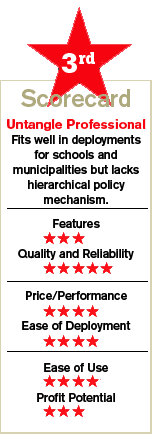
Unfortunately, the Untangle software binds firewall settings to each of its racks. Firewall settings have to be replicated to different racks, so there's no hierarchical policy mechanism put in place. For racks to work, IPs are mapped through policies. The company is working to change the flat mechanism into a hierarchical one.
Out of the box, the Untangle server is configured with optimal settings, so partners do not need to configure most of the Layer 7 products. The company assumes full control of its solution so that customers do not have to make any changes to Untangle gateway boxes. If Untangle swaps out software because it finds something better, the transfer and build process is done automatically for all customers.
VARs can still have plenty of custom work configuring policies. Untangle uses virtual racks to develop policies that affect different groups of users. For instance, a teacher's rack has more access to the Web than a student rack. Solution providers can map different traffic to virtual racks based on time of day, Active Directory names and IP addresses.
Untangle can deploy its software in businesses with up to 2,000 connected users, but the core of its business is at the low end of the midmarket with companies that have 150 to 200 employees.
Like other open-source commercial-grade products, Untangle charges for technical support for its Professional version. The Professional package includes integration with Active Directory and supports SSL VPN and other management features.
Next: The Bottom Line The Bottom Line
It all came down to a photo finish between Fortinet and WatchGuard. Both companies have good channel programs and have a dedicated sales staff to help partners win bids. WatchGuard wins by a slim margin because of its innovative proxy technology and its powerful realtime logging features. WatchGuard's HTTP proxies play an important role in shaping traffic in the appliance. The technology is unique in the way it interrogates data streams.
On the other hand, the Fortinet solution arrives with a comprehensive firewall policy engine. Reviewers found FortiGate firewalls to be fast and reliable. Fortinet also offers other products so that its UTM solutions can scale up to large and complex enterprise networks.
Untangle cannot yet measure up to the other two. Yet, the Professional package offers a good solution for schools and municipalities that cannot afford large midmarket UTM devices.
VENDOR:
Fortinet, Inc.
Sunnyvale, Calif.
\
(408) 235-7700
\
\
\
•
PRODUCT:
FortiGate 1000A
\
•
LIST PRICE:
$14,995.
\
•
PARTNER INCENTIVES:
8-20% margins.
\
•
PROGRAM PARTNERS:
1,500 partners
\
•
PROGRAM COSTS:
Technical training $2,250
\
•
DISTRIBUTORS:
Ingram Micro, Tech Data, Alternative Technology.
VENDOR:
WatchGuard Technologies
Seattle, WA
\
(206) 613-6600
\
\
\
•
PRODUCT:
Firebox x6500e
\
•
LIST PRICE:
Firebox X family $480 - $14,999.
\
•
PARTNER INCENTIVES:
Margins not disclosed. Demo units 50% off.
\
•
PROGRAM PARTNERS:
500 partners.
\
•
PROGRAM COSTS:
None.
\
•
DISTRIBUTORS:
Ingram Micro, Tech Data.
VENDOR:
Untangle, Inc.
San Mateo, CA
\
(650) 425-3300
\
\
\
•
PRODUCT:
Untangle Gateway Platform
\
•
LIST PRICE:
Open source edition is free. Professional Package ranges from $25/mo. - $250/mo.
\
•
PARTNER INCENTIVES:
25% to 40% margins
\
•
PROGRAM PARTNERS:
170 partners
\
•
PROGRAMS COSTS:
None.
\
•
DISTRIBUTORS:
None