How To Perform A Virtual Machine Set-Up In Ten Minutes Or Less
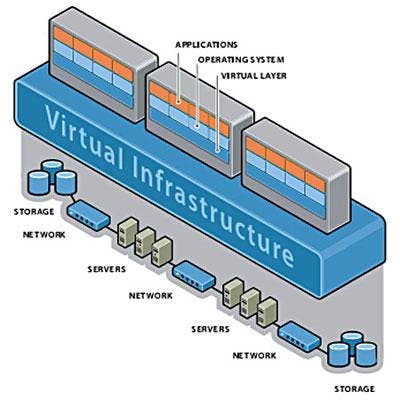
Virtual Machine Set Up: Keep Those VMs Rollin'
Virtual machines are spawning faster than fruit flies at a farmer's market. This year VMs outnumber physical ones for the first time, Microsoft told me recently. But in the rush to provide accounting with workloads for its quarterly closings, do administrators sometimes leave high availability tasks for later? "Just set it up with snapshots for now. We can add mirroring and migration routines on Monday," might be an all-too-frequent IT refrain. Addressing this problem is Stratus Technologies.
The CRN Test Center this week looked at the latest version of Avance, its bare-metal HA hypervisor and management system that runs on standard Intel-based hardware from Dell, HP, IBM and approved white-box providers, and is administered 100 percent through a browser. At $5,000 list for two server licenses regardless of core count, this solution is aimed squarely at SMBs seeking a set-and-forget solution for their mission-critical apps. Resellers should know about this elegant alternative to Hyper-V and VMWare.
Stand Up And Be Virtual
Although the systems we tested arrived with software pre-installed, Stratus says its two-server solution can stand up from ISOs in about 30 minutes. Stratus creates two machines that are identical in every way, right down to their IP and MAC addresses, and remain that way through a dedicated Ethernet line connecting the two machines. Unlike HA solutions from VMware and Microsoft, Stratus does not require a shared SAN; updates written to one server's internal storage systems are not acknowledged until both nodes are in sync.
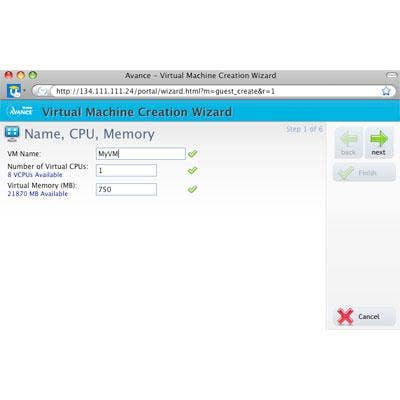
Seen here is the first screen for creating a new virtual machine, where it has named and assigned CPUs and memory. Not unlike VMware, system maximums are shown, easing this first step. After this screen, however, the two soon part company.
ISO Want To Fly
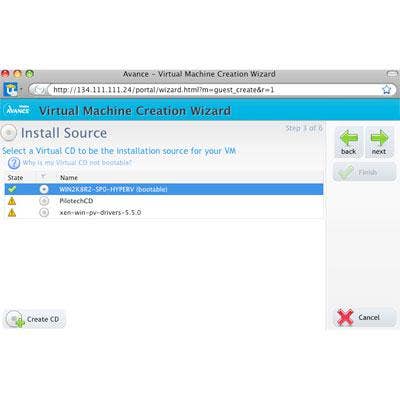
Once a selection is made between Linux and Windows VMs (not shown, to spare you the boredom), the next step is to select the source operating system that will run there. A list appears showing virtual CDs of the corresponding type that have been created in advance. These might include one or more of a company's "gold" images containing operating-system policies and applications pre-installed.
Notice the "Create CD" button at the bottom of the page. This allows admins to create a required image "on the fly." This prevents the need to back out of the VM creation process to make the image, then repeat creation process all over again. Images can be exported as OVA files and used to kick off other projects. Context-sensitive help is available at all stages.
No SAN For You
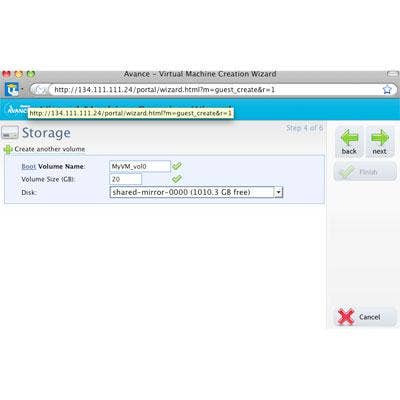
Step four is to create a storage volume name and capacity for the VM, and to tell it on which physical disk to live. As in other steps, green check marks appear when the data entered in the space is legal and within limits. A drop-down list of known physical storage is presented along with the free space on each. Although SANs are supported, the Stratus solution does not require them in order to provide high availability. Instead, the Avance software keeps data up to date on the server-attached storage systems of both machines of the fail-over pair.
Networking Made Simple
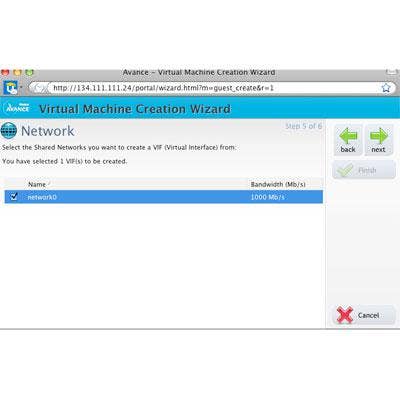
The test machines were equipped with just two network interfaces, one of which was dedicated to node-to-node communications. This list, therefore, contains just the one remaining interface. Most servers would be equipped with more Ethernet interfaces, of course, and those would obviously be listed here. Simple (and unfortunately, also a little bit boring).
Sum It Up
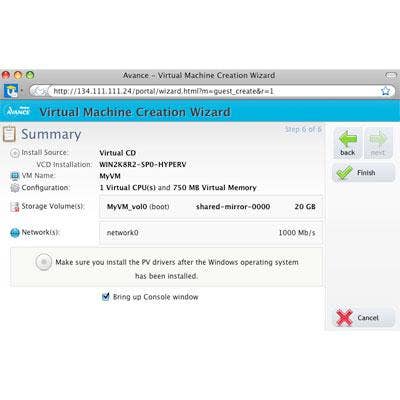
In the end, a summary screen is presented to allow confirmation of the settings from the previous screens. The Back button is available if something needs to change. Near the bottom, you'll notice a "Bring up Console Window" check box. When this is checked, Avance spawns a Java applet to display what's happening inside your new VM (shown next).
Ready To Load
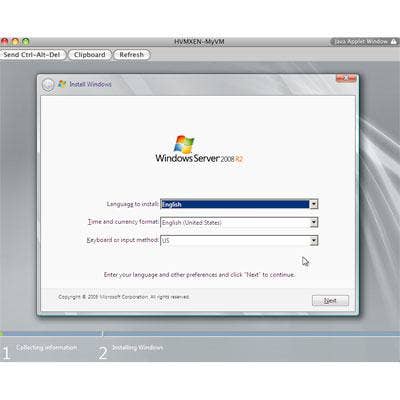
Once we had finished creating our virtual machine, we knew it was successful with the appearance of this familiar screen. From here, it's just a matter of following prompts to complete the set up of Windows Server 2008 R2. It's important to note that all administrative tasks and functions can be done through a browser. Even the console screen is in a browser-friendly Java applet (as opposed to native code on competitive platforms). According to the company, once a Stratus server is up and running, there's never a need to visit the server for administrative duties.
Dashing Through HA
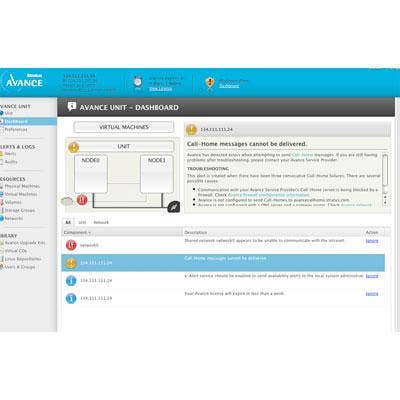
In the Avance Dashboard, the right-hand pane displays real-time messages and images of system health and events effecting availability and other parameters. In the left-hand pane, a familiar tree-style interface provides quick links to major functionality. The virtual machine steps invoked earlier were accessed (logically) under Virtual Machines in the Resources section. under Libraries, Avance also allows VMs to access Linux repositories and kickstart files, as well as "para-virtualized" repositories for network and disk drivers, which can help maximize VM performance.
Even if no one in your organization is prone to dropping screws or cups of coffee into servers (as seen in this jaw-dropping video), the Stratus Technologies Avance hypervisor is ready to handle it. Included with the $1,200-per-year service (list) is a call-home feature that the company says helps Stratus system self-resolve up to 90 percent of problems threatening server availability. Through its partner program, Stratus offers free training, deal registration and specialised programs for financial, government, manufacturing and health-care sectors.