Bake-off: 4 Virtualization Suites (In One Review!)
This new trend in software development is fueling the need for virtualized development and test environments, partly as the deployment of multitier applications across distributed data centers has become so common.
Developers might have to pass code to other groups or access systems in different locations to make sure their code works. Testers also need access to the system to evaluate the new code. Poor coordination can spiral out of control, becoming schizophrenic without virtualization. While hypervisor technology provides the infrastructure to simplify development, some management tools are necessary to streamline the development process.
Scorecard: Quick Click Comparisons of All 4 Virtualization Packages
CRN Test Center engineers evaluated server virtualization and management products from SWsoft, Virtual Iron Software, VMware and XenSource. For testing, engineers used Intel Duo core and Quad core servers along with two Hewlett-Packard notebooks. Engineers evaluated the products based on ease of deployment, management consoles, features geared toward development, price/performance and profit potential.
Next:VMware Infrastructure 3 VMware Infrastructure 3
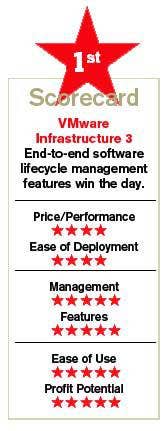
VMware, on track soon to go public via a partial spin-off from EMC, took first place, offering the best virtual environment for application development. The vendor's main advantage comes from its key product, Lab Manager, a Web tool designed to support software developers and testers in highly distributed environments.
The end-to-end software life-cycle management capabilities provided by Lab Manager were unmatched by any of the other products reviewed here.
Before installing Lab Manager, ESX Server, part of VMware's Infrastructure 3 suite, must be installed on one or more x86 physical servers. The next step is to install the VirtualCenter Management Server, which runs on top of a Microsoft Windows machine and is the control point for multiple ESX Server hosts. The next step typically is to start creating virtual machines (VMs) from existing physical machines using a tool called VMware Converter, which is the vendor's physical-to-virtual conversion tool.
VMware Converter takes the boot and data disks from a physical machine and converts them into bootable virtual disks in the container formats that VMware ESX Server can use to run virtual machines.
VMware limits guest OS memory to 16 Gbytes. Memory as well as other resources are reserved for a VM and always given to that machine as long as it is not idle. VMware also identifies an OS installed on a host and saves only one copy of the common memory page while keeping track of the differences. VMware calls this feature transparent memory page sharing. The end result is that administrators can power on VMs with more memory allocated to them than the actual physical memory of a host machine.
ESX Server provides a sophisticated network configuration by creating virtual bridges between physical NICs and virtual NICs. The NIC configuration feature can also group virtual NICs into teams to increase the fault tolerance of a system. This option is great for clustering and high availability setups. Administrators can take advantage of more capable hardware on a server by letting VMs connect to a NIC team.
ESX Server's storage settings are complex since they depend on direct-attached SCSI disks connected to remote Fibre Channel SANs. Each VM has a view of its storage disk as it was attached to a SCSI disk. In addition, administrators can connect multiple virtual disks to a VM. All virtual disks look like they are attached to the machine.
VMware's VMotion live migration technology is capable of transferring VM images on a single SAN, so the migrations are performed extremely fast. ESX Server now has the ability to manage clusters of physical hosts that are treated as a single resource pool. With ESX Server installed on several host machines, administrators can treat them as a single pool of CPUs, memory and stored resources, and deploy virtual machines across clusters of hosts.
With an ESX Server in place, it's up to Lab Manager to oversee the development life cycle. Lab Manager 2.5 installs on a server or a VM. Through a browser, administrators can set up server pools using a library of VM configurations. The server pool can connect to Microsoft Active Directory so it can take advantage of existing user accounts.
Lab Manager behaves like a source-control tool in that developers work with libraries and must check out applications. However, that's as far as the similarities go. It more closely resembles a provisioning tool that works with physical configurations on which software can be developed and tested.
Lab Manager looks across a pool of ESX Servers and moves each VM to the best host for each application component. By checking out a VM, developers immediately get to see all the components associated with an application. The check-out process takes VMs out of suspension, allowing developers to start from the same point as testers.
What's more, Lab Manager allows developers to open and work on multiple consoles simultaneously that are being viewed from a single Web page. This technology allows developers to treat multiple VMs as a single application. Lab Manager can also check out a configuration on developers' work spaces by copying VMs, a useful feature when testing.
Instead of making complete copies, Lab Manager actually creates linked clones to the disk images that represent the VMs. As developers make changes in a VM, only the deltas are saved by a configuration. Whenever the delta files are applied to the base images, developers can get back to the changes where the test states have been made. Since the delta files are small, many developers can work on each image independently.
Once code is fully tested, it's usually pushed to an IT change- management group, where developers do all integration work and stage up the application. Administrators push applications into production and manage them once they're there. VirtualCenter comes into play once applications are running in production. VMware makes the process seamless.
Next: XenSource XenEnterprise 4.0 XenSource XenEnterprise 4.0
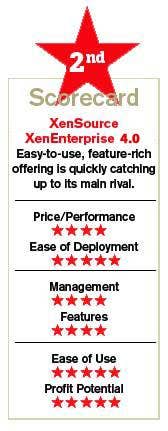
XenSource earned kudos for its ease of use and is doing an admirable job of adding features to catch up to VMware. Still, XenSource's offering lacks the software life-cycle management features that VMware has built, landing it in second place.
At the heart of XenSource is the Open Source Xen Hypervisor, which runs on bare metal under any OS and uses a stripped-down enterprise Linux OS to supply management and I/O services for VMs running alongside it. Traditionally, XenSource has primarily offered a Linux-on-Linux solution, but the company is starting to break from tradition with its new XenEnterprise 4.0.
The 4.0 release arrives with a new XenCenter console that requires Windows XP, Windows 2003 server or Vista to run. The new console is capable of managing physical and virtual environments. XenEnterprise and the new midtier server arrive with a true 64-bit hypervisor, which now supports a lot more memory.
On the 4.0 platforms, physical servers can have up to 128 Gbytes of memory, while virtual memory can be set up to 32 Gbytes. The platform now has key features, such as support for resource pools of up to 16 physical servers with shared storage.
The resource pools provide shared configurations, allowing administrators to cover multiple servers at once rather than updating each individually. The new server also supports dynamic resource allocation for disks, CPUs and networks. Windows guests can only receive new storage dynamically. Linux VMs can get virtual CPUs and network connections dynamically.
Like the other products covered here, XenCenter 4.0 supports live migrations. XenSource matched VMware for performance of live migrations; engineers did not notice any significant delays.
XenCenter is also capable of controlling VMs on the fly. Administrators can suspend VMs to disk without changing their original state. This a huge step forward for XenSource because now developers can suspend VMs when developing applications and perform testing with different resources.
XenCenter has a ways to go until it can provide the cohesive access that large development and testing groups require when building enterprise applications. However, XenServer is the best product to use in small to midsize Windows IT shops. Despite its limitations, engineers found XenServer to be the easiest product to navigate and configure with Windows servers. This virtualization server is useful for developing and testing simple multitier applications.
Next: SWsoft Virtuozzo SWsoft Virtuozzo
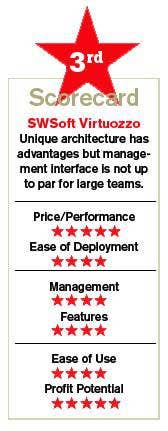
SWsoft takes a unique approach with Virtuozzo, which offers operating system partitioning rather than VMs. This architecture has some advantages, namely that its single-OS environment is easier to understand and more intuitive for users. Still, its management interface doesn't allow all of the functionality a large development team would need, landing it in third place.
Virtuozzo virtualizes the OS by using an efficient shared file-based model to manage applications and resources. Essentially, it eliminates the translation layer required for emulating instruction sets of x86 machines and ultimately the emulation of CPUs.
Virtuozzo's host OS creates isolated partitions that act like virtual environments (VEs) on a single physical server. Unlike hypervisor-based VMs, Virtuozzo can build hundreds of VEs on a single physical server, each with the same properties of a physical machine.
Virtuozzo's VE advantage over VMs becomes clear when designing large-scale virtual infrastructures. Organizations that use VMs to consolidate a large number of physical servers into just a few physical servers will still need to use the same number of OS instances to run the same applications. Because VMs are fairly easy to create, the number of OS instances often can end up exceeding the original number of physical servers.
In contrast, Virtuozzo eliminates the need to maintain all of these OS instances because VEs work on top of single-host OSes. Organizations that use VEs only need to use one OS per consolidated physical server. The simpler architecture of the VE also has less performance overhead, so software engineers are more inclined to use it when running critical systems and enterprise-packaged applications.
Essentially, Virtuozzo extends multitasking and multithreading capabilities already included in modern OSes to create and control virtual environments. A unique CPU scheduler maintains execution priority based on the weight given to each environment. Unlike the encapsulated architecture used by VMs, VEs are simply a collection of processes that are managed from the native scheduler of a host OS.
Virtuozzo's host OS uses a dynamic resource-management technology that's not available on hypervisor-based products. Administrators can change the memory of a VE in realtime, while the environment and applications are running. With hypervisors, administrators have to reboot a VM to add more virtual memory.
Having the ability to allocate memory dynamically is extremely useful when running applications that have an unpredictable memory bandwidth. For instance, environments that are running databases and are not clustered can easily start lacking memory whenever large numbers of transactions surpass predefined settings. With Virtuozzo, the database environments can automatically receive memory in realtime once they reach a threshold.
Setting memory dynamically is quite simple in Virtuozzo. The software also provides a command-line interface and an XML API, which allows developers to integrate VEs with third-party monitoring tools. Setting up development environments inside VEs is only useful when working with a small group of developers and testers. Managing large-scale projects would require direct access to single physical machines, which is not easy to arrange in large organizations.
Like the other tools in this review, Virtuozzo can perform live migrations. But unlike the others, Virtuozzo does not require a SAN to transfer environments. Virtuozzo's live migrations will work on stand-alone servers with local disks.
In addition, Virtuozzo can perform large application updates and mass provisions across multiple environments at once.
Because Virtuozzo works with a single OS, CPU and file system caches are managed efficiently between VEs. Virtuozzo also uses a copy-on-write file system, which maintains all memory pages, OS files and application files as single instances. OS files are shared among environments using pointers to those files, instead of using copies.
Next: Virtual Iron Enterprise Edition Virtual iron Enterprise Edition
Open-source economics and recent hardware processor technologies such as Intel Virtualization Technology (VT) and AMD Virtualization (AMD-V) allows companies like Virtual Iron to compete with more established virtualization players.
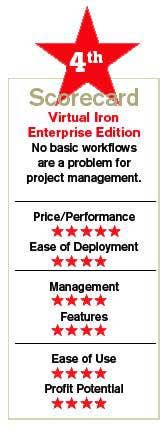
While Virtual Iron's products can perform many of the same functions as VMware's offering—Virtual Iron utilizes open-source Xen hypervisor technology—engineers could not use it to build simple workflows, a key feature for any large development team.
Typically, hypervisors only provide a minimal layer for OSes to run as VMs. Similarly, Virtual Iron's control partition has the bare-bones components necessary to support virtualization.
Virtual Iron finds more value building new management solutions rather than inventing hypervisor technologies. That's why the company uses XenSource's hypervisor. According to Virtual Iron, customers are more willing to buy ready-made solutions, such as disaster recovery and virtual desktops built on top of a virtualization technology, because they can get immediate value from these systems.
Virtual Iron also supports live migrations, allowing users to switch VMs without any physical downtime. Virtual Iron used to enjoy an advantage in this area over XenSource, but that has disappeared now that it supports live migrations as well.
Virtual Iron promotes live migration for data center load-balancing and maintenance. For instance, physical servers running at maximum capacity can be off-loaded quickly by moving VMs to other physical servers.
Like VMware, Virtual Iron can run 32-bit and 64-bit OSes side by side. Virtual Iron supports a host of hardware products, such as iSCSI, VLAN switches and SAN disks, but primarily needs Intel VT or AMD-V to work.
Virtual Iron's Virtualization Manager arrives with many configuration options. Administrators can assign network adapters to VLAN networks, add storage from local disks, iSCSI disks or Fibre Channel disks and select multiple memory configurations. Other configurations, such as booting from PXE or CD-ROM, also are available.
Virtual Iron uses policies to coordinate sets of features. For instance, a policy called Live Recovery allows administrators to move virtual servers to other nodes if a current node goes offline. If power fails, a backup server can bring up all the virtual servers in their previous states without setting up clustering software. Policies allow automation of many high-level tasks. Administrators can activate policies to rebalance virtual data centers and restart virtual servers.
Developers can use the Virtualization Manager to start new or cloned virtual servers. They can also import or export applications into virtual hard disks. Open-source developers can find prebuilt appliances, such as a LAMP stack, and import them right into a virtual server.
Next: The Bottom Line The Bottom Line
While all four virtualization solutions accommodate the needs of IT development, VMware stood above the others for providing the best end-to-end virtualized environment specifically designed for development.
The biggest challenge for IT is to build communications between a large team working on the same development project. VMware's ESX server is built for that, including the most features by far. XenSource's XenServer is the simplest product to use and has new features that enable it to compete on a more level playing field with VMware and SWsoft. XenEnterprise is price-competitive and also scales higher than VMware's enterprise solution.
SWsoft offers an interface that's easy to understand, but its capabilities don't rise to the level many development teams would require. Virtual Iron's interface just wasn't friendly enough for engineers to build simple workflows.
Simply put, systems integrators and application providers can certainly use all four products to develop and test systems but on more complex distributed infrastructures, they will be hard-pressed to meet deadlines without VMware's Lab Manager to monitor workflow, integration schedules and code assets.
VENDOR:
SWsoft
Herndon, Va.
\
(703) 815-5670
\
\
\
•
PRODUCT:
SWsoft Virtuozzo
\
•
LIST PRICE:
Virtualization core license, $1,250/CPU; management tools, $1,000/seat.
\
•
PARTNER INCENTIVES:
15% tp 35% margins, MDFs, professional services.
\
•
PROGRAM PARTNERS:
80 in U.S.
\
•
PROGRAM COSTS:
Training costs $3K plus travel expenses.
\
•
DISTRIBUTORS:
Software House Intl., Tech Data.
VENDOR:
Virtual Iron Software
Lowell, Mass.
\
(978) 849-1200
\
\
\
•
PRODUCT:
Virtual Iron Enterprise Edition
\
•
LIST PRICE:
$499 per processor.
\
•
PARTNER INCENTIVES:
25% discount for Premier Partners, access to joint marketing funds.
\
•
PROGRAM PARTNERS:
95 in U.S.
\
•
PROGRAM COSTS:
None.
\
•
DISTRIBUTORS:
Tech Data.
VENDOR:
VMware
Palo Alto, Calif.
\
(877) 486-9273
\
\
\
•
PRODUCT:
VMware Infrastructure 3
\
•
LIST PRICE:
Starting at $1,000.
\
•
PARTNER INCENTIVES:
Did not disclose due to IPO.
\
•
PROGRAM PARTNERS:
Thousands in U.S.
\
•
PROGRAMS COSTS:
Did not disclose due to IPO.
\
•
DISTRIBUTORS:
AltTech, Ingram Micro, LifeBoat
VENDOR:
XenSource
Palo Alto, Calif.
\
(650) 798-5900
\
\
\
•
PRODUCT:
XenEnterprise 4.0
\
•
LIST PRICE:
$1,250.
\
•
PARTNER INCENTIVES:
15% tp 30% margins, professional services.
\
•
PROGRAM PARTNERS:
150 in U.S.
\
•
PROGRAMS COSTS:
$1,200.
\
•
DISTRIBUTORS:
Tech Data