The Daily App: Samsung Kies for Android, Mac OS X, Windows
Samsung develops and markets terrific devices for Android; the Galaxy Tab is one of the best we've seen. Why then does Google report so many searches for help figuring out how to transfer files to and from the device?
The task confounded us here in the CRN Test Center recently as we attempted to place media files on our highly acclaimed Samsung tablet, since there's no SD card slot or other easy way to move files around. According to Samsung, the device is supposed to appear on the desktop as a mass storage device when plugged into a computer's USB port, provided the setting is enabled in the device's Wireless and Networks settings.
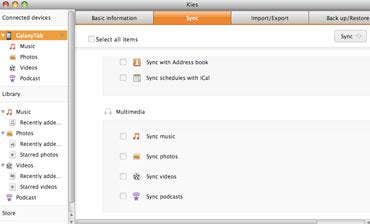
For the times that it doesn't, there's Samsung Kies for Mac OS X and Windows. Similar to Apple's iTunes, the Kies application presents a two-pane interface with media types in a tree format in the left pane and the media itself on the right, keeping all selected media types in sync between computer and Tab.
But Kies handles more than pictures, music, movies and podcasts. The tool also can be used to synchronize contacts and iCan events, and import Outlook data, memos and messages and other data. It also can be used to backup all device data and settings, or just those selected.
There's also a mechanism for moving files from the host PC directly to the Android device's file system, but it took a while to find it. When clicking the "Internal Storage" button on the Basic Information tab, a dialog appears that permits files to be copies by drag-and-drop. Kies is free, supports WiFi and works with a select group of Samsung devices, including the Galaxy S, Galaxy SII, Galaxy Tab and Wave and Wave II units.