ThreatLocker Unveils Zero Trust Network And Cloud Access: 5 Things To Know
The zero-trust product expansion aims to give MSPs a massive protection boost against threats from phishing and network exposure, ThreatLocker CEO Danny Jenkins tells CRN.
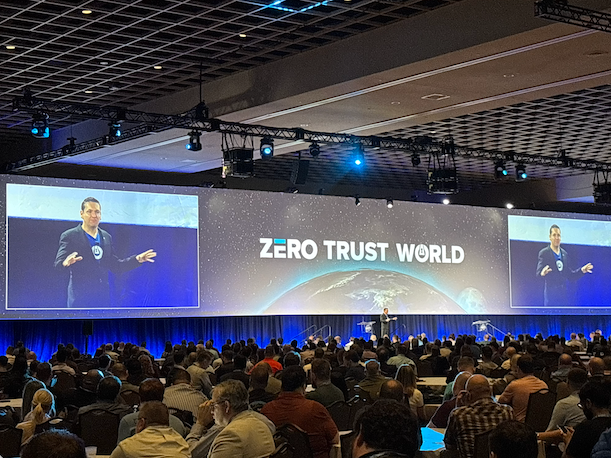
ThreatLocker announced its expansion into offering zero trust network and cloud access tools Thursday, with the aim of delivering a massive protection boost for MSPs against phishing and network exposure threats, ThreatLocker Co-founder and CEO Danny Jenkins told CRN.
The major product expansion was announced in connection with ThreatLocker’s Zero Trust World 2026 conference in Orlando, Fla.
[Related: Surging Threats, Complexity Means VPNs Are On Their Way Out: Experts]
ThreatLocker’s debut of zero trust network and cloud access offerings brings the vendor’s deny-by-default approach in a bigger way to SaaS and mobile devices, Jenkins said. The unveiling follows a year of work by ThreatLocker, which built 14 new data centers—a dozen of which are located in the U.S.—to support the products, according to Jenkins.
What follows are five things to know about ThreatLocker’s launch of zero trust network and cloud access capabilities.
Zero Trust Cloud Access
With the zero trust cloud access product, ThreatLocker is protecting against the effectiveness of compromised credentials in key SaaS applications such as Office 365, Salesforce, Jira and ConnectWise, Jenkins said in an interview with CRN.
The product does this through binding access to the SaaS apps both to the user and to their approved device, making stolen credentials ineffective, according to Jenkins.
With ThreatLocker’s zero trust cloud access offering, an attacker can steal someone’s credentials through phishing, but will “never get into their account,” he said. “We’re now authenticating the user—using the regular app authentication—plus the device. That means [a threat actor] cannot get in from anywhere else in the world.”
Zero Trust Network Access
For zero trust network access (ZTNA), meanwhile, ThreatLocker has eliminated exposed ports and the need for VPNs while enabling users to access internal resources securely, as if they were in the office, Jenkins said.
“Every legitimate attack we see is because someone decided to open ports on their public firewall, or access, or has a VPN, and then someone gets into the VPN,” he said, which is an issue addressed by the new offering.
“No ports are scanned, nothing is open on the internet,” Jenkins said. “You can just open anything as if you were sitting in the office.”
UX, Performance Improvement
A key differentiator for ThreatLocker’s zero trust network and cloud access offerings is that the company is “selectively brokering traffic, as opposed to routing it through our data centers,” Jenkins said.
For instance, ThreatLocker has removed the voice traffic and the media traffic, since it's already authenticated and “someone can't gain access with just that,” he said.
The result is that performance is significantly better than with competing tools, according to Jenkins.
Meanwhile, the “user experience is an absolutely unbelievable difference,” he said—with users able to simply connect one time, and never have to do so again unless they disconnect.
Boosting Security Offerings For MSP
The new offerings provide a dramatic increase in security capabilities for MSPs that are often on the front lines of protecting against accelerating phishing attacks, Jenkins said.
“The biggest challenge MSPs are having right now is, their users keep getting phished,” he said.
The new products allow an MSP to say to their customer, “‘You want access to [an app] on your phone? Here's an app to download. It takes two seconds. You hit connect. You never have to think about it again,’” Jenkins said.
“They can now grant access to Office 365 or they can push it out through the MDM [mobile device management], if it's a company-managed phone, and they don't even have to think about it again,” he said.
Extending Deny-By-Default To New Segments
ThreatLocker has long seen its zero-trust security platform as “a vault door on a bank” when properly configured, Jenkins said.
“We've always done that on the endpoint, and now we’re extending that to the cloud and to mobile devices,” he said. “So you're now in a much better position where it gets much, much harder [to get hacked].”
Ultimately, “our philosophy is deny-by-default. Our business is entirely focused around, how do we allow by the exception?” Jenkins said. “Because the trick of this is not to deny by default, but to allow what you need and deny everything else. And it’s the same principle with this—I’m allowing what I need.”