Office By Any Other Name
With the likes of Google, Adobe and others angling to develop online competitors, reviewers took a look at OpenOffice.org 3.0 ahead of its launch to see what it brings to the table.
For testing, OpenOffice.org was installed on a PC running Microsoft Vista and Office 2007 Professional. The download installation file is a manageable 112 MB, vs. Office, which is a little more than a half-GB. The application was installed on the client as a remote network installation, configured as a silent install without requiring user intervention. Total install time was under 10 minutes and no reboot was required.
The database module, OpenOffice.org Base, now supports Microsoft Access 2007 .accdb files. An ODBC connection was set up on the workstation, and the data source was used to connect Base to the Access data. Tables were readily accessible; reports opened up and were edited without any issues. Full functionality was retained of all database objects created in Access. The 3.0 beta release also has two new menu items: Insert----->Record and Edit----->Delete Records, both of which are accessible from the table data view of a table.
With OpenOffice.org Calc, spreadsheets created in Microsoft Excel 2007 were opened without incident. There is now also greater flexibility with charts and graphs. Reviewers used Calc to open a 25-page spreadsheet, rife with complex calculations and macros. Calc took almost a full minute to open the spreadsheet, while Excel handled it in a few seconds. Also, upon closing the file, Calc froze. This crash was recreated a second time. Excel did not have any issues closing the same file.
The 3.0 beta has an enhanced print dialogue box. It is now possible to define what part of a spreadsheet is to be sent to printers, and the new collaboration feature allows multiple users to work on a spreadsheet simultaneously.
With the Impress presentation module, reviewers encountered no problems opening Microsoft PowerPoint 2007 slides. Slide transitions applied in PowerPoint carried over in Impress. The slideshow was edited in Impress as well. OpenOffice has also added more animation options for the slide transitions.
The word processing module, Writer, opened Office 2007 Word documents with ease, and vice-versa. Writer now has block feature selection available, but there is still no grammar check. The spell check feature is not as intelligent as the one in Word. When the word "actually" was misspelled as "ac sully," Writer's spell check suggested "sully" and "accentually" as replacements. Word's spell check was able to make the correct replacement (Word uses Encarta by default as its dictionary. OpenOffice.org includes one of several user-defined dictionaries).
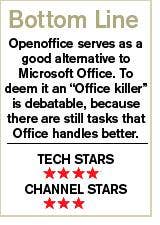
We stopped short of recommending it, but there is still plenty to admire about OpenOffice.organd#8212;the fact that it is free probably being the most endearing to the masses. The application suite, in a pinch, has proven itself as a viable option to Microsoft's Office.
Whether VARs want to direct clients towards OpenOffice as a software solution depends on a variety of factors: budget, client's dependence on complex spreadsheet processes and macros (advantage here to Excel) and the interoperability of OpenOffice with unified communications platforms and e-mail and messaging systems. Yet, there is a choice, and that is always a good thing.