Review: Internet Security On The Spot
Securespot offers virus protection, parental control (content blocking), an integrated firewall, network activity reporting, identity protection, antispyware, a spam blocker and a popup blocker -- which pretty much encompasses all of the security needs of a typical SOHO.
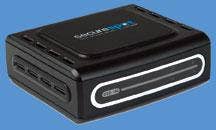
The device, which includes a one-year software subscription for four users, employs multilayer security to protect users on the network. A Web service layer manages network security using real-time updates of antivirus, spam, spyware and content-filtering databases. A physical layer provides network perimeter protection through the firewall, content and virus filtering, application control, identity theft and reporting. Also, a desktop layer applies antivirus and spyware detection and removal, popup control and application control.
About the size of a deck of playing cards, Securespot uses a miniscule AC power adapter and has two Ethernet ports -- one for a LAN connection, one for a WAN connection. The idea is to be able to put the unit between the broadband connection (cable or DSL modem) and the network router.
Completely wizard-driven, installation is a snap. Once the hardware is in place, installers will have to set up an administration account with D-Link's managed-service security site, the SecureSpot control center, located at securespot.bsecure.com. The control center is used to define access policies, choose protection levels and assign policies to individual PCs or users.
The combination of premise-based hardware and a managed service implementation should be of interest to solution providers looking to offer remote configuration support as part of a service contract.
For antivirus, antispyware and general anti-malware protection, an agent must be installed on the client PCs. Securespot's $99 price (MSRP) includes four client licenses for the Securespot thin-client software. Renewal for the four licenses is $79 per year, and additional user licenses can be purchased for $19.95 per year. D-Link could make the product more channel-friendly by offering VARs commissions for pushing additional user counts and renewing client licenses. Updating Securespot's firmware entails multiple steps that require going directly to the IP address of the unit (in most cases, 192.168.229.61) and then following the administration prompts to upload a firmware file that must be downloaded from D-Link's site. Enabling this process directly from the Securespot control center would be a better way to do this.
Though Securespot adds some latency to network traffic, most users won't notice any performance degradation, and some may actually experience increased performance because of the elimination of any desktop firewall software or security suites.
While most of the default settings will offer adequate control for the typical SOHO environment, administrators could spend hours fine-tuning Securespot's security profiles. Administrators can create individual policies for content filtering by selecting which catagories are blocked or choose to simplify content filtering by going with one of the four default settings, which are based on age groups (Children, Tweens, Teens and Adults). Those policies can applied to the network, individual PCs or individual users. In many cases, administrators will go the route of devising a network policy and then creating machine-specific policies to customize access.
For those looking to keep an eye on who is doing what on the network, Securesport offers simplified reporting. The reporting module focuses more on violations than on all-out activity, but it still does an adequate job of highlighting traffic anomalies and threats to security.
Those concerned with identity theft will appreciate the product's identity-protection module, which only allows personal or financial information to be transmitted to authorized sites. Administrators can quickly define those sites using the control center. The popup and spam blockers are very easy to implement. Administrators can block all popups or require user permission before allowing a popup to occur. The antispam module basically identifies and tags spam, leaving the filtering of spam to a user's preferred e-mail client.
Securespot's firewall also allows granular control. Administrators can select which ports can be open and can define which applications are allowed. The device even can block Skype traffic if desired, a task often not accomplished by other firewall products.
Fountain Valley, Calif.-based D-Link seems to have hit the nail on the head when it comes to providing security for SOHOs. Although Securespot isn't perfect, it still ranks as one of the best security appliances available for the SOHO market -- and at a price that can't be beat. Originally designed for home networks, Securespot may very well be an ideal add-on for small businesses struggling with today's plethora of security threats.